Passkeys now available in Sophos Central
Passwords are becoming a thing of the past. With Passkeys, signing in becomes simpler, faster, and more secure. In this article, you will learn how Passkeys work and what specific advantages they offer for Sophos Central.
What are Passkeys and how do they work?
Passkeys are a modern, passwordless sign-in method based on the FIDO2 standard. The key difference from traditional passwords is that there is no shared secret that can be stolen or intercepted. Instead, Passkeys use cryptographic key pairs: a public key and a private key. The private key remains securely on the user’s device, while the public key is stored on the service provider’s server. Authentication uses the private key, protected by biometrics such as fingerprint or facial recognition, or by a PIN. This makes signing in easier for users and significantly more secure, because there is no password that can fall into the wrong hands.
The biggest advantage of Passkeys is the much smoother user experience. There are no long, complex passwords to remember and no SMS codes that could be intercepted. Users authenticate with a biometric factor or a simple PIN and can sign in quickly without managing passwords. Compared with traditional multi-factor authentication, this is a clear step forward. Modern cloud synchronization also makes it easy to use Passkeys across multiple devices. For example, a user who creates a Passkey on a smartphone can also use it on a laptop or tablet without additional setup steps. In a connected world where people use more and more devices, that is a major convenience gain.
Another important aspect is resilience against phishing attacks. Because Passkeys do not transmit reusable secrets, they are highly resistant to phishing attempts. Users cannot be tricked into disclosing credentials on fake websites because no reusable information such as a password is ever sent. This significantly improves security compared with traditional passwords.
Passkeys now available in Sophos Central
Since November 7, 2024, Sophos Central has also supported signing in with Passkeys. Instead of entering a password and then an MFA code, you simply use the Passkey. This removes an extra sign-in step and saves a noticeable amount of time. Given that the Sophos Central website sign-in can already feel slow, this is a meaningful improvement.
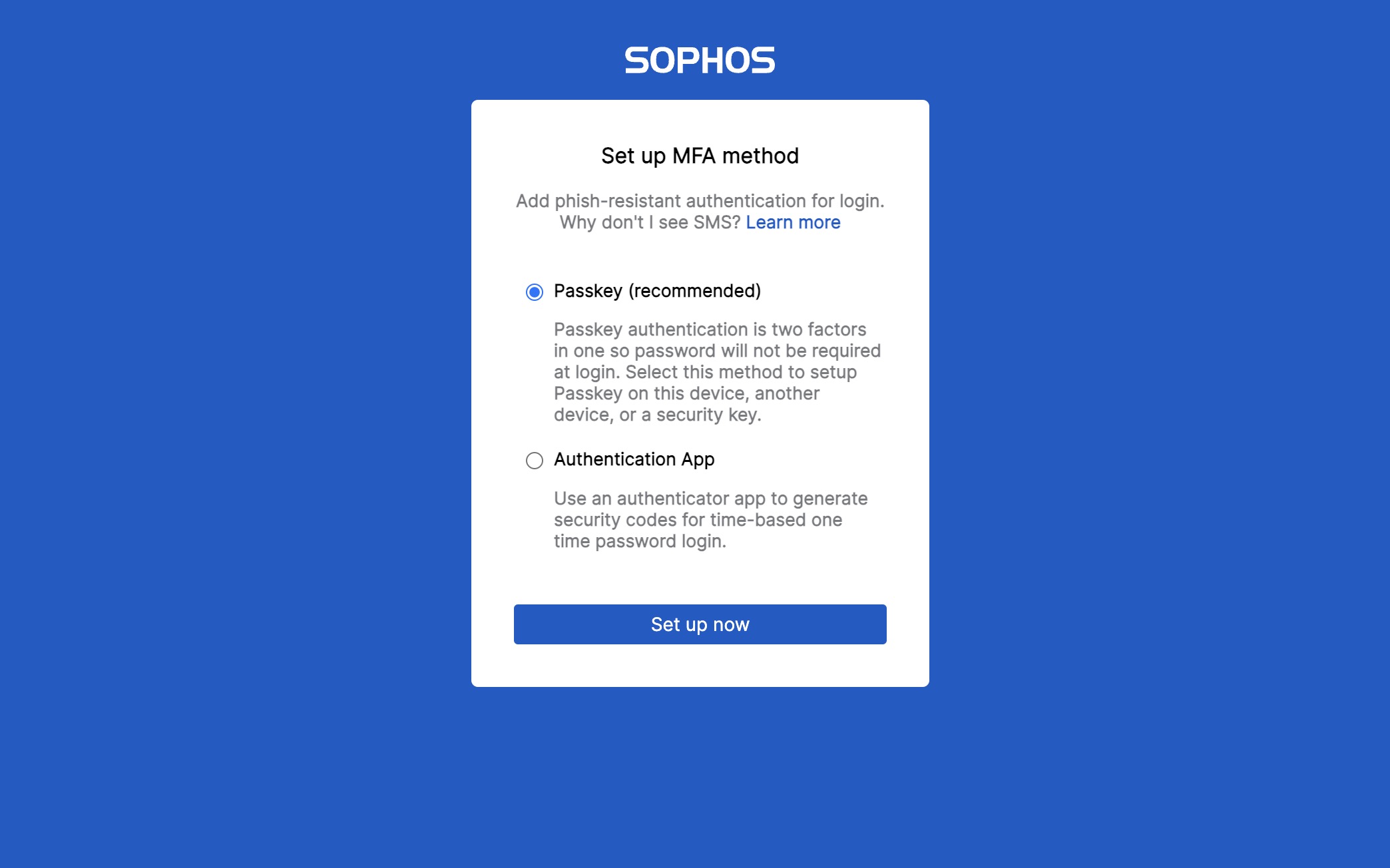
Signing in is not only faster, but also more convenient because users only need their biometric factor or a simple PIN to gain access. This saves more than just a few seconds; it also improves the overall user experience, especially for frequent users who sign in to the platform regularly.
For administrators, integrating Passkeys into Sophos Central also brings advantages. Implementation and management are simpler because complex password policies become less important. Problems with forgotten passwords and repeated account resets are also reduced, which improves both security and IT support efficiency. Passkeys are closely tied to the user’s device, helping ensure that only authorized users can access the corresponding accounts.
More information:
What does this mean for users?
The introduction of Passkey support significantly simplifies the sign-in process. Instead of typing a password and then having the MFA factor ready, you only need a device with a stored Passkey. This saves time and improves security, because it removes the risk of phishing attacks and other password-theft methods. The private key stays protected on the user’s own device and never leaves that security boundary, making it much harder to intercept. Biometric security features also add a personal layer of protection that is not as easy to compromise as a password.
For users, switching to Passkeys means both a simpler sign-in process and a general reduction in security risk. Anyone with a compatible device can start using the benefits of Passkey technology immediately and no longer has to deal with the complexity of passwords and password management. For companies in particular, this is a major advantage because it improves both usability and the security of the overall infrastructure.
The end of SMS or Email + PIN
Sophos also plans to phase out older and less secure methods such as SMS or Email + PIN as MFA options. This move to more modern and secure sign-in methods is part of the effort to make Sophos Central even more secure and to align with CISA Secure by Design initiatives. Moving away from SMS- and email-based authentication is a necessary step toward stronger security standards. SMS codes are particularly vulnerable to man-in-the-middle attacks and SIM swapping, which means they are no longer a reliable security measure. With Passkeys, these weaknesses can be avoided because no external communication channels are required.
- Effective immediately, new users can no longer set up SMS or Email + PIN as a second authentication method. For new accounts, only a TOTP app (e.g. Google Authenticator, Microsoft Authenticator, Authy, 1Password, OTP Auth) can be used as the second factor. Existing users are not affected by this change.
- From February 2025, existing users who still use SMS or Email + PIN for authentication will be actively prompted to switch to more secure alternatives such as Passkey authentication or a TOTP app.