Sophos Firewall v21: New features and improvements
Sophos Firewall v21 has been officially available since October 17. In this article, we describe the new features in this release.
⚠️ Update to Sophos Firewall v21
- ✅ XGS Appliances
- ✅ Sophos Firewall VMs or software installations
- ❌ Appliances End of Life
- ❌ SG Appliances with Sophos Firewall OS End of Life
The update to Sophos Firewall v21 is available only for XGS appliances as well as VM and software firewalls. XG appliances and SG appliances with SFOS will not receive this update and will reach End-of-Life (EOL) on March 31, 2025. Anyone affected by End-of-Life can find all the details in the XG End-of-Life article.
Let’s Encrypt
With Sophos Firewall v21, you can use Let’s Encrypt to obtain, renew, and manage SSL/TLS certificates free of charge and automatically. The Let’s Encrypt integration in Sophos Firewall v21 makes certificate handling easier and ensures that certificates are renewed automatically before they expire.
FINALLY! For years, this has probably been one of the most requested features, and Sophos really took its time here, even though FortiGate has been able to do this for more than a year 🫣.
Automatic certificate creation
Let’s Encrypt certificates are valid for 90 days and are automatically renewed by Sophos Firewall 30 days before expiration. This significantly reduces manual certificate management effort and ensures that the firewall always uses valid certificates.
Supported interfaces
Let’s Encrypt certificates can be used in the firewall for various web services:
- Web Admin Console
- User Portal
- Captive Portal
- VPN Portal
- SPX Portal
- WAF (Web Application Firewall)
However, Let’s Encrypt is not supported for the following services:
- Remote Access VPN
- Site-to-Site VPN
- Chromebook SSO
Domain validation via HTTP

The certificates are validated using the HTTP challenge-response mechanism. The firewall creates a temporary web server configuration and a WAF policy to complete the challenge and validate the domain. The temporary firewall rules and virtual web server are automatically removed after the certificate has been issued successfully.
Domain management
You can request certificates for up to 50 domains, with only fully qualified domain names (FQDNs) being supported. Wildcard domains and IP addresses are not permitted.
Using Let’s Encrypt certificates
To create a Let’s Encrypt certificate, register a Let’s Encrypt account in the firewall, add the desired domains, and configure the WAN interface for HTTP domain validation via port 80. The DNS records must point to the firewall’s public IP address.


The issued certificates can then be used for the WebAdmin console, user portals, and the Web Application Firewall (WAF) to provide secure HTTPS connections.
A detailed guide is available in this video:
UX and UI improvements
Central UI now on the firewall
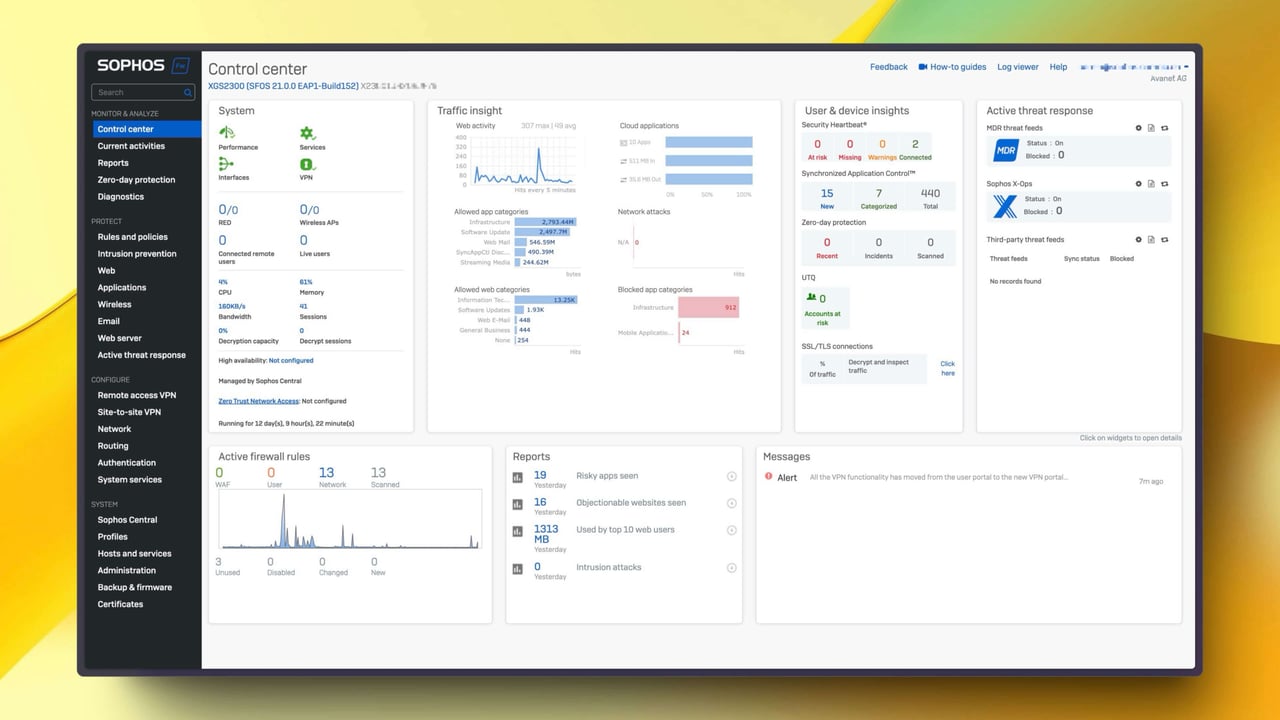
With the update to Sophos Firewall v21, the user interface has been revised to improve navigation and data visibility. The new sidebar and adjusted color scheme provide a clearer structure. The dashboard now makes better use of available screen space by scaling to a width of up to 1920 pixels. This allows more information to be shown at once and makes it easier to keep an overview.

The widgets have also been adjusted to make more information available at a glance. The card layout makes it easier to separate different data categories. These changes allow faster access to security-relevant information and system status messages.

Overall, the revised interface aims to make working with the firewall more efficient, and it is of course good to see Sophos finally doing something in this area again. I hope the topics hide warning messages in the dashboard and backend performance will also be addressed soon.
Object referencing
The object referencing feature was added to Sophos Firewall with v20.
Sophos Firewall v21 provides a way to track the use of objects such as interfaces, zones, gateways, or SD-WAN profiles in the configuration. Because the usage locations are transparent, changes to an object can be made more deliberately. Cleaning up unused objects also becomes easier because you can quickly see whether they are still in use or can be removed.
Object Reference API
The Object Reference API introduced in Sophos Firewall v21 makes it possible to automatically retrieve the usage count of configuration objects. The API can be used to quickly see how often an object is used in the configuration. This is particularly useful when managing a large number of hosts or interfaces.
The API allows programmatic queries of reference counts and supports filters to search for specific objects. This provides an efficient way to identify unused objects and remove them where appropriate. The API can also be integrated into automation workflows, saving time on recurring tasks such as system cleanup.
Third-party threat feeds
Sophos Firewall v21 supports the integration of third-party threat feeds for automatic threat defense. This feature extends the existing threat intelligence integration from Sophos X-Ops and Sophos MDR with external threat data sources. Sophos Firewall can now automatically process threat indicators from third parties, Managed Service Providers (MSPs), or industry-specific consortia and block threats across multiple subsystems.
Automated blocking
As soon as threat indicators are provided by a third-party feed, they are automatically integrated into firewall enforcement. Threats such as malicious IP addresses, domains, and URLs are immediately blocked across all relevant security modules, including the firewall itself, IPS (Intrusion Prevention System), DNS blocklists, web filters, and Deep Packet Inspection (DPI).
Polling interval
The frequency with which the firewall updates the feeds can be configured flexibly. Administrators can set the interval anywhere from one hour to 30 days. This makes it possible to control threat data updates as needed.
Support for multiple feeds
Sophos Firewall can manage up to 50 different threat feed sources. These feeds must follow a specific format: each Indicator of Compromise (IoC) is transmitted as a single line in a .txt file via HTTPS.
Authentication and security
The integration of external threat feeds usually requires authentication. Sophos Firewall supports various authentication methods, including Basic Authentication and token-based authentication. This ensures that only authorized threat data sources are used.
Support for external feeds significantly improves the firewall’s defensive capabilities. Threats from industry-specific or regional feeds can be detected and blocked without manually creating additional firewall rules.
Threat feed providers
Here is a small selection of providers that offer threat feeds.
Cybora
Cybora provides a curated threat intelligence feed that combines data from hundreds of firewalls worldwide, community sources, and commercial feeds.
The focus is on active, high-risk indicators such as command-and-control servers, botnet scanning, brute-force attacks, and phishing infrastructure. Scoring, deduplication, and short expiration logic keep the lists current, clean, and practical.
Delivery is provided as simple IP and domain lists via HTTPS and updated several times a day. Cybora is compatible with Sophos Third-party Threat Feeds, Fortinet, Palo Alto Networks, and other platforms.
Cybora specializes in firewall deployments and, in our view, offers a very strong price-performance ratio. It is the solution we prefer to use for our customers. (Avanet ❤️ Cybora)
- Solution details: Sophos Firewall Threat Feeds
CrowdSec
CrowdSec is an open-source solution for defending against cyber threats, supported by crowd intelligence. It offers automated blocklists and threat feeds collected from a global community. CrowdSec helps identify and block threats in real time by aggregating threat information from many participants.
GreyNoise
GreyNoise focuses on analyzing “internet noise” by examining global network activity to identify which activity is likely malicious. It filters out harmful network traffic that does not represent a direct attack on your own infrastructure, helping reduce false positives and prioritize real threats.
Cisco Talos
Talos is Cisco’s threat research unit and offers one of the largest commercial threat intelligence feeds worldwide. It includes detailed information on global threats, vulnerabilities, and attackers. Talos supports cyberattack detection and defense with current threat data.
Abuse.ch / URLhaus
Abuse.ch is a platform specializing in tracking and blocking malicious domains and IP addresses, especially malware and botnets. URLhaus is a project by Abuse.ch that focuses on reporting and blocking URLs used to distribute malware.
Hakk Solutions
Hakk Solutions is a provider of security information and services specializing in threat intelligence and security monitoring. Its services include threat data that can be used to identify and defend against cyberattacks.
OSINT (Open-source Intelligence) / DigitalSide
DigitalSide offers Open-Source Intelligence (OSINT) feeds based on publicly available information. These feeds contain data on malicious IP addresses, URLs, and domains collected from various public sources.
CINS Score (CINSscore.com)
CINS Score offers threat data based on network traffic analysis, helping identify malicious hosts and networks. It uses machine learning and heuristic algorithms to evaluate potentially dangerous IP addresses.
EclecticIQ
EclecticIQ delivers threat data and analytics for companies and security operations teams. The provider offers comprehensive threat intelligence services that make it possible to detect and respond to threats.
Feodo Tracker
Feodo Tracker is another Abuse.ch project specializing in tracking botnets, especially Feodo, Dridex, and Emotet. It provides information about the command-and-control servers used by these botnets, helping identify and block malicious activity.
DigitalSlide Threat Intel
DigitalSide offers threat intelligence feeds with a focus on Open-Source Intelligence (OSINT). It collects publicly available information on malicious IP addresses, domains, and URLs. These feeds are particularly useful for identifying threats early because they are based on a broad range of public data sources and are updated regularly.
Proofpoint - Emerging Threat Intelligence
Proofpoint offers comprehensive threat information through its Emerging Threats Intelligence Feed. This service focuses on real-time updates about emerging threats, including new attack techniques and vulnerabilities. Proofpoint uses machine learning and expert analysis to deliver detailed insights into global threats, helping companies respond more precisely to cyberattacks.
Endpoint Threat Indicators
Sophos Firewall v21 can integrate and analyze Indicators of Compromise (IoCs) from endpoints. Both managed and unmanaged endpoints are supported. As soon as an endpoint detects malicious activity, this information is sent to the firewall. The firewall analyzes these IoCs and blocks suspicious activity.
This feature is particularly useful for improving synchronization between endpoints and the firewall. Threat attempts detected on endpoints can then be stopped directly across the entire network. This real-time analysis supports rapid threat response and attack containment.
Synchronized Telemetry
The firewall can correlate threat attempts from endpoints by including details such as executed processes and applications. This improves threat detection and analysis. As soon as an endpoint detects suspicious activity, this information is automatically sent to the firewall to block the threat across multiple network layers.
Automatic Blocking of Threats
If a malicious process is detected on a managed endpoint, the firewall automatically blocks the associated IP address, domain, or URL. This applies to subsystems such as the firewall, DNS blocklists, web filters, and Deep Packet Inspection. This seamless integration between firewall and endpoints significantly reduces response time to threats.
One example would be an unmanaged endpoint attempting to access a malicious URL. The firewall would intervene immediately and block access without the endpoint itself requiring special configuration. This also protects devices that are not directly managed by Sophos Endpoint Security.
The ability to process IoCs from endpoints offers administrators an additional layer of defense, as the firewall reacts not only to network traffic but also to detailed threat information from the endpoints themselves.
Lateral Movement Protection
Lateral Movement Protection is mentioned again in Sophos Firewall v21 because this version includes significant improvements and optimizations. In v21, integration and coordination with other security features such as Synchronized Security and Active Threat Response (ATR) have been improved in particular. The firewall can now respond to threats faster and more efficiently by automatically isolating compromised devices and blocking the spread of threats in the network.
Lateral Movement Protection prevents threats from spreading through the network by isolating compromised devices. As soon as an endpoint is identified as compromised, communication with other devices in the network is blocked. The firewall also shares this information with other endpoints, which then block network access for the compromised device as well.
This feature increases security across the entire network by preventing threats from moving laterally from one device to the next. It is particularly useful in large networks, where quickly isolating infected devices can be critical to preventing an incident.
MAC Address Blocking
When an endpoint is identified as compromised, the firewall shares the MAC address of that device with all other endpoints in the network. The endpoints then block network access for the infected device. This ensures that threats cannot continue spreading through the network.
Heartbeat Status
The firewall continuously monitors the Heartbeat status of the endpoints. As soon as an endpoint is identified as compromised, the Heartbeat status turns red and triggers an immediate blocking mechanism. Communication from the compromised endpoint is interrupted immediately, enabling effective containment of the threat.
A typical scenario would be an endpoint attempting to move laterally through the network after being compromised. With Lateral Movement Protection enabled, this endpoint is isolated immediately and its communication is blocked. This prevents the spread of malware, such as ransomware, that might try to infect additional devices.
A prerequisite for this feature is that the firewall and Sophos endpoints are connected through Sophos Central. This enables synchronization between the security solutions and ensures that threats can be detected and isolated quickly.
Threats and IoC Reporting
Like previous versions, Sophos Firewall v21 offers reporting functions both on the device (OnBox) and in the cloud through Sophos Central. These reports make it possible to analyze threats and network activity in detail and provide valuable insight into the network’s security posture.
In Sophos Firewall v21, reporting has been expanded through the integration of Threat Sources and Threat Events, as well as support for Synchronized Indicators of Compromise (IoC). Reports now provide detailed information about threat sources and their specific events. You can track threat attempts precisely by seeing which devices, IP addresses, or users were involved and which firewall modules blocked the threat.
Particularly noteworthy is support for Synchronized IoCs. Threat data from Sophos Central, Sophos Managed Detection and Response (MDR), and third-party feeds is synchronized. This extension provides deeper insight into threats by analyzing affected processes and endpoints in more detail. Administrators can see not only where threats occurred, but also how they affect endpoints and network components.
This video explains third-party threat feeds again in detail:
Static route and VPN improvements
VPN UX improvements
Sophos Firewall v21 introduces several user interface (UX) improvements for managing VPN connections more efficiently.
Bulk activation and deactivation
Administrators can now activate or deactivate multiple VPN connections simultaneously.

This saves considerable time, especially when managing large networks with many VPN tunnels. Deactivation is handled quickly through a central button in the VPN management area.
Extended filter options
The VPN connections overview page now has improved filtering, making it easier to navigate through multiple pages of VPN configurations. These filters include both free-text input and value-based search options, making it easier to manage and find specific networks, subnets, or users for remote access and site-to-site VPNs.
XFRM interface filter
An additional filter option for XFRM interfaces has been added. XFRM interfaces, which are often used in VPN configurations, can now be identified and managed more easily. This is particularly useful when VPNs are built over VLANs and WAN interfaces.
Site-to-Site VPN
Sophos Firewall v21 introduces several improvements for Site-to-Site VPNs, focusing on both usability and performance.
DHCP relay over XFRM tunnels: One of the key new features is support for DHCP relay over XFRM tunnels. This makes it possible to reach DHCP servers behind remote firewalls, which was previously only possible with policy-based VPNs. This is particularly useful in SD-WAN environments where dynamic IP addresses need to be provided over tunnels.
Improved FQDN support: When configuring remote gateways in IPsec VPNs, both FQDNs (Fully Qualified Domain Names) and their resolved IP addresses can now be used. This improves scalability, especially in environments with high DNS latency, where FQDN resolution could affect VPN connection performance. Administrators can choose whether to use FQDNs or resolved IP addresses in the configuration.
The new features in the Site-to-Site VPN area provide more flexibility and improve scalability in larger, distributed networks. Interface recovery time is now up to 20 times faster, drastically reducing downtime during tunnel interruptions, restarts, or HA failover scenarios.
Route Management
Route management in Sophos Firewall v21 has been expanded with new features and improvements to simplify the management of static and dynamic routes and increase network stability.
Static Routes

Activating and deactivating routes
Administrators can now activate or deactivate individual routes directly, which significantly simplifies troubleshooting and management of network connections. This enables precise control over routing behavior in real time.
Route cloning
With the new route cloning function, existing routes can be easily duplicated and adjusted. This saves time during configuration and ensures consistency across different network interfaces. Each route can also be given a description to improve clarity.
Dynamic Routes
Extended support for OSPF and BGP
The firewall now supports forwarding BGP routes to OSPF v3, improving interoperability between different routing protocols. This is particularly useful in complex networks with multiple sites and protocols.
HA improvements
In High Availability (HA) failover scenarios, the stability of dynamic routes has been significantly improved. In previous versions, multiple connection interruptions could occur during failover; now this happens only once, increasing the reliability of network connections.
Google Authentication
Support for Google Authentication has been expanded in Sophos Firewall v21 to make it easier to integrate Google Workspace and Chromebooks.
LDAP-based integration
Sophos Firewall now supports Google Workspace integration through a regular LDAP client. This enhancement makes it easier for companies using Google Workspace to authenticate their users through Sophos Firewall without relying on Active Directory. Support for Google Workspace SSO (Single Sign-On) will follow in future versions.
Chromebook SSO support
The firewall now offers SSO (Single Sign-On) functionality for Google Chromebooks connected to LDAP servers. This functionality was previously limited to Active Directory. It allows Google users to access secured resources without additional sign-in steps.
Improved SSO performance
Authentication has been improved so that the firewall can process requests from multiple SSO mechanisms (e.g. STAS, RADIUS SSO, Synchronized User ID) more efficiently. In environments with a high number of simultaneous requests, the server can now respond to authentication requests up to four times faster and discard duplicate requests once a user is authenticated.
Closing words
Overall, Sophos Firewall v21 is a solid annual update that brings small but important UX and UI improvements as well as new features that further strengthen network security.
We are happy to continue collecting your feedback on which features you are currently missing. In the post Sophos Firewall Feature Request 2024, we have already summarized many of your suggestions and are already working on the list for 2025. You are welcome to send us further wishes and suggestions via the contact form.