Sophos Firewall v21.5: New features for security and usability
Sophos Firewall v21.5 is here and brings a broad set of new features and improvements that strengthen your network security and simplify management. In this blog post, we introduce the most important changes in SFOS v21.5, including the long-awaited Entra ID Single Sign-On (SSO) integration and the powerful NDR Essentials for advanced threat detection. We also cover improvements in VPN scalability, DNS Protection, the user interface and more. Let’s look at what is new in Sophos Firewall v21.5.
Sophos NDR Essentials: Advanced Threat Detection
Network Detection and Response (NDR) is a key component of modern cybersecurity, helping organizations detect and respond to threats by monitoring network traffic. With SFOS v21.5, Sophos introduces NDR Essentials, a cloud-based NDR solution integrated directly into the firewall.
NDR Essentials uses artificial intelligence to analyze metadata from TLS-encrypted traffic and DNS queries, detecting malicious activity without having to decrypt the traffic. This preserves firewall performance and respects user privacy. The solution is free for customers with the Xstream Protection Bundle and requires no additional hardware.
Key benefits of NDR Essentials:
- Detection of complex threats: Identifies sophisticated attacks, including those using encrypted channels or dynamic domains.
- Cloud-based solution: No impact on firewall performance, as analysis takes place in the Sophos Intellix Cloud.
- Easy integration: Activation via the firewall’s Active Threat Response menu.
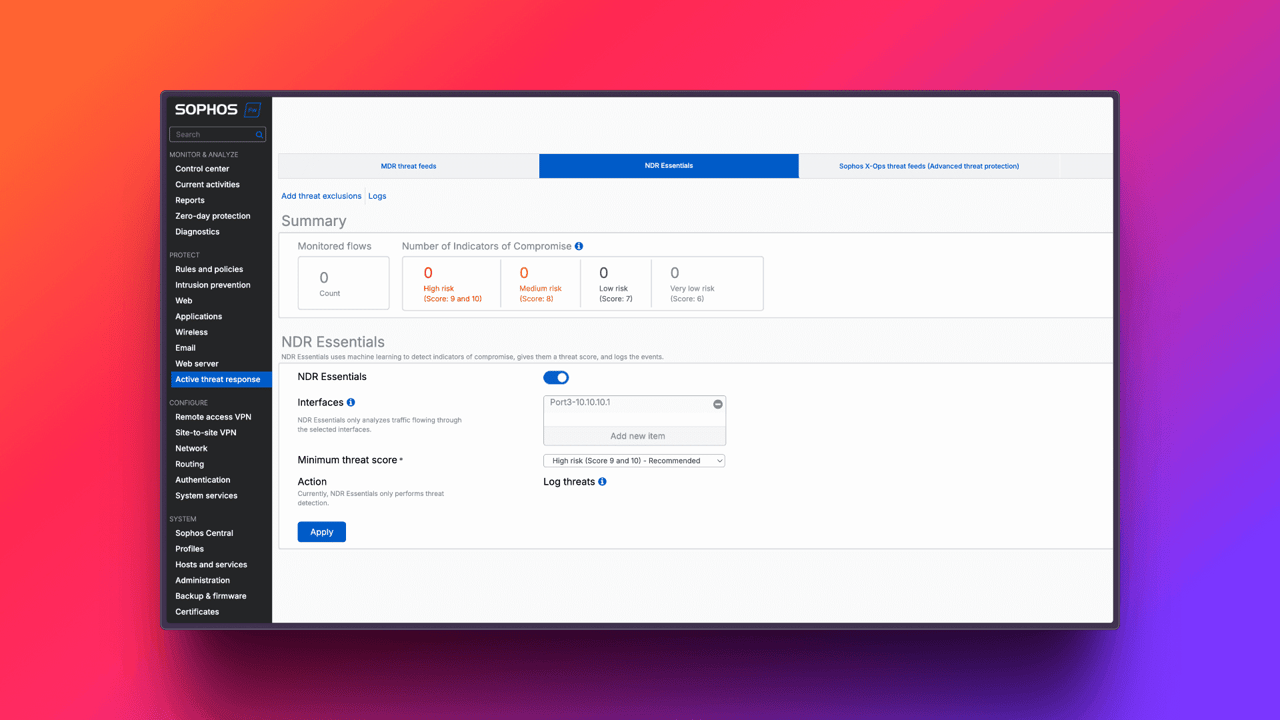
How does it work? NDR Essentials analyzes encrypted traffic and DNS queries using two AI engines: Encrypted Payload Analysis (EPA) and Domain Generation Algorithm (DGA) detection. Detections are rated on a scale from 1 (low risk) to 10 (high risk). Administrators can set a threshold above which notifications and alarms are triggered. All detections are logged and can be viewed in detailed reports both on the firewall and in Sophos Central.
Setup: To activate NDR Essentials, navigate to Active Threat Response in Sophos Firewall v21.5, select the NDR Essentials tab and enable the feature. Select the interfaces to monitor, such as those with high internet traffic, and set the minimum threat score (recommendation: 9-10 for high risk).

License requirements: NDR Essentials requires an active Xstream Protection Bundle license. A 30-day trial is available for non-customers. The feature is currently supported only on XGS hardware, not on virtual or cloud devices. HA Active-Active mode is also not supported.
Why is this important? NDR Essentials focuses on gateway traffic and offers a “Lite” version compared to the full Sophos NDR, which also monitors internal network traffic. For more comprehensive insights, Sophos recommends the full NDR solution or the Managed Detection and Response service. Product page: Sophos MDR.
For a detailed demonstration, watch the video on NDR Essentials:
Entra ID Single Sign-On: Simplified VPN Access
Managing user authentication for VPN access can be complex in large enterprises. Sophos Firewall v21.5 introduces Single Sign-On (SSO) integration with Microsoft Entra ID (formerly Azure AD), making access to the VPN portal and Sophos Connect Client easier.
This integration uses OAuth 2.0 and OpenID Connect protocols to enable seamless authentication. Users log in once with their Entra ID credentials and gain access to VPN services without having to re-enter credentials.
Key features:
- Support for Sophos Connect Client: Version 2.4 and higher on Windows platforms.
- Multi-Factor Authentication (MFA): Fully supported with Entra ID.
- Unified configuration: The same Entra ID SSO server is used for VPN portal, SSL VPN and IPsec configurations.
Setup: To configure Entra ID SSO in Sophos Firewall v21.5, set up the authentication server with the Azure Application ID. Make sure the URLs for the VPN portal and remote access are registered as callback URLs in Azure. For the Sophos Connect Client, a provisioning file specifying the gateway settings must be imported. Here is an example:
[
  {
    "gateway": "vpn.domain.com",
    "vpn_portal_port": 443,
    "check_remote_availability": false
  }
]
The “gateway” value must match the callback URL configured in Azure to ensure SSO functionality. This file enables both traditional login and the SSO option in the Sophos Connect Client.
Why is the provisioning file necessary? The file ensures that the Sophos Connect Client uses the correct gateway settings and enables SSO. Without this configuration, the connection might fail or the SSO option might not appear.
Limitations:
- The feature is currently only available for Windows-based Sophos Connect Clients.
- Users migrating from previous SFOS versions with Azure AD SSO must add the callback URI for the VPN portal in the Azure application.

This feature significantly improves the user experience, especially in environments already using Entra ID for authentication, and enhances security through MFA support.
VPN and Scalability Improvements
SFOS v21.5 brings several improvements to VPN functionality and scalability that optimize management and performance:
- User interface updates: “Site-to-Site” VPN connections are now called “policy-based”, and tunnel interfaces are referred to as “route-based” to improve clarity.
- Improved IP lease pool validation: Optimized checks for SSL VPN, IPsec, L2TP and PPTP to avoid configuration errors.
- Strict IPsec profile enforcement: Ensures that IPsec connections comply with defined security policies.
- Increased tunnel capacity: Support for up to 3,000 route-based VPN tunnels and up to 1,000 Site-to-Site RED tunnels with up to 650 SD-RED devices.
These improvements make VPN management more intuitive and scalable, especially in larger enterprise environments.
Sophos DNS Protection: Improved Integration
Sophos DNS Protection, a “free” service for Xstream Protection customers, receives several updates in Sophos Firewall v21.5:
- New Control Center Widget: Provides a quick overview of the DNS protection status.
- Improved troubleshooting: New logs and notifications make problem solving easier.
- Guided setup: Step-by-step instructions for simple configuration.
These additions simplify monitoring and management of DNS-based security directly through the firewall interface.
Management Improvements
Sophos Firewall v21.5 introduces several improvements to the user interface and management:
- Customizable table columns: Column widths in tables (e.g. SD-WAN, NAT, SSL, Hosts, VPN) are now customizable and remain saved in the browser.
- Advanced search functions: Free-text search is now available in SD-WAN routes and local ACL rules, making navigation easier.
- Changes in default configuration: Default firewall rules and rule groups have been removed, and the default action is set to “None”, encouraging administrators to define explicit security policies.
- New font: A new font improves the readability of the user interface. (At least that is what Sophos thinks; anyone who knows a little about typefaces and has looked at this more closely may see it differently.)
These changes improve the user experience and make firewall configuration and management more efficient.
Further Improvements
SFOS v21.5 includes a number of other improvements that increase flexibility and security:
- License updates: Virtual, software and cloud licenses no longer have RAM limitations; instead, they are limited by the number of cores.
- WAF file size limit: The Web Application Firewall now supports configurable file size limits up to 1 GB, which is useful for larger uploads.
- Security telemetry: Real-time monitoring of changes to core operating system files using secure hash validation to detect unauthorized changes.
- DHCP improvements: Support for larger IPv6 prefixes (/48 to /64), with Router Advertisement (RA) and DHCPv6 enabled by default.
- Path MTU Discovery: Improved to fix TLS decryption errors, especially for advanced cryptographic methods such as ML-KEM.
- NAT64 support: Enables translation of IPv6 to IPv4 traffic in explicit proxy mode, making IPv6 adoption easier.
These updates contribute to a more flexible, secure and efficient firewall solution.
Closing words
Sophos Firewall v21.5 delivers significant advances in threat detection with NDR Essentials and simplifies user access with Entra ID SSO. Together with improvements in VPN scalability, management and security features, SFOS v21.5 is a robust upgrade for companies that want to strengthen their network security. The Xstream Protection license is gradually offering more value than it did when the license was introduced.