Sophos ITDR: What does it add to MFA and MDR?
A former service provider still has access to the Microsoft 365 tenant. An application has more permissions than it needs. An administrator account is protected by a weak authentication method. None of these risks requires malware to be running on a computer. They arise in the directory, in accounts and in their access rights.
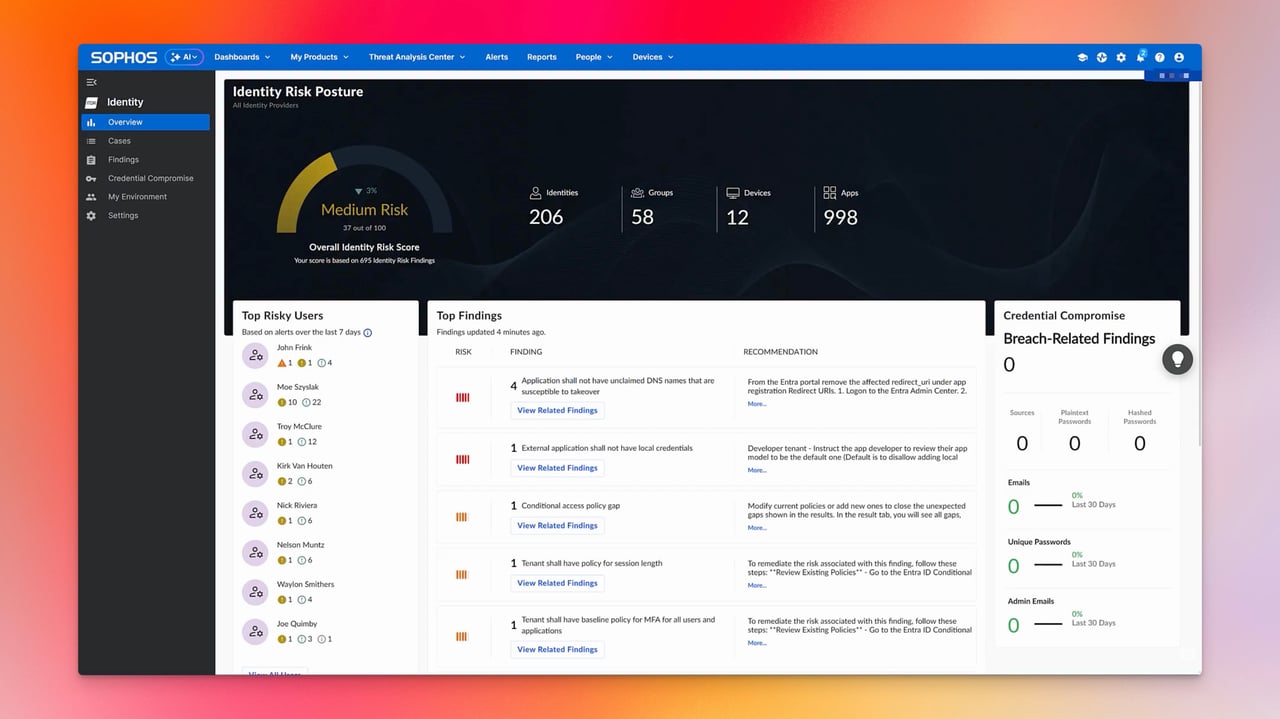
Sophos ITDR examines identities and their security configuration in Microsoft Entra ID and on-premises Active Directory. It helps IT teams identify and address risky permissions and account weaknesses. Sophos calls these identified security risks findings.
What is Sophos ITDR?
ITDR stands for Identity Threat Detection and Response. The software combines directory information, security assessments and indications of compromised credentials. It is managed in Sophos Fusion, formerly Sophos Central.
Since the product update of 15 October 2026, ITDR has also been available as a standalone product. An XDR or MDR licence is therefore not a prerequisite for purchase. Combining these products can still be useful, but does not automatically transfer every task to a managed security service.
With an Entra ID integration, the cloud directory service supplies the data. On-premises Active Directory can be connected independently through a separate, read-only sensor. This does not require an Entra ID integration. Both connections support security assessments and are distinct from user synchronisation for other Sophos products.
Which risks become visible?
ITDR examines permissions, identity configurations and indications of inadequate sign-in protection, for example. Dark Web Intelligence helps assess relevant exposed credentials. Such a finding needs to be checked: an old leak does not automatically mean a currently valid password or a successful intrusion.
The Directory views cover non-human identities such as applications and service principals as well as people. ITDR also shows Microsoft AI agents, their owners and permissions. This answers the question of which identity may access data. It is not content inspection of every prompt or agent action of the kind expected from a comprehensive AI firewall.
The Identity Risk Score helps assess identity risks. If you also want to assess applications or other technical identities, check the available scope during a pilot before purchasing. An entry in the Directory view does not automatically mean that a score is available for it. Our guide to the Identity Risk Score explains the details.
What does ITDR add to MFA?
MFA protects sign-in through an additional factor. It does not clean up excessive permissions, orphaned accounts or an unnecessarily privileged application. ITDR helps find these conditions and prioritise the work needed.
Consider the guest account of a former service provider. A second factor protects its sign-in, even though access is no longer needed after the project ends. If the account comes to attention during a review in ITDR, the IT team checks with the relevant department whether an engagement is still active. It then removes unnecessary permissions or disables the account. After the next data sync, it checks the corrected state in ITDR. This turns an identified risk into a traceable remediation.
The on-premises AD sensor does not add MFA to Windows sign-ins. It reads directory data and assesses the security configuration. Adding another factor to local sign-ins requires a suitable MFA solution.
Can ITDR also respond?
Depending on the connected directory and the configured action, ITDR can, for example, reset passwords, revoke sessions or disable accounts. For Entra ID, response capabilities must be configured with the necessary permissions. Actions in on-premises AD additionally require an on-premises data collector with the On-Premise Automation Connector and LDAP access to the directory. The read-only AD sensor alone does not make these changes.
Our guide to findings and response explains this distinction. For a compromised cloud identity, configured session revocation can be a concrete response. Simply changing a finding’s status, by contrast, only records progress and does not prove that an identity is secure.
For hybrid accounts, the authoritative directory also matters. A change made only in the cloud may be altered again by the next synchronisation. Before any action, it is therefore necessary to establish which system determines the state and which applications depend on the identity.
Does MDR take over the findings?
With a separately licensed MDR service, the Sophos team investigates active identity threats and certain critical or high-severity findings that indicate an active attack. The organisation’s own IT team or an appointed partner handles the remaining findings on an ongoing basis.
Removing unnecessary permissions therefore remains an operational responsibility. In the former service provider example, the organisation must decide whether access is still needed. Before deployment, establish who reviews new findings, approves changes and checks their effect. The ITDR prerequisites help with preparation.
Prerequisites and costs
The Entra ID integration requires Microsoft Entra ID P1 or P2. Entra ID Free is not sufficient. Setup also requires administrator permissions to approve the requested access for the entire tenant.
For on-premises Active Directory, the sensor must be installed and operated in your own environment. The Entra P1/P2 requirement applies to the Entra connection, not to an on-premises-only AD integration. Response capabilities are configured separately as described above. Both options require an activated ITDR licence and a supported tenant region.
ITDR is licensed per user. In addition to Sophos, total costs may include Microsoft licensing and operating the local components. Allow time for reviewing and addressing findings as well.
In a pilot, I would test the workflow using the guest account example. An approved test account or an existing, confirmed finding is suitable for this. IT checks the displayed data, removes unnecessary access and reviews the reassessment after the next data sync. This helps establish whether ITDR provides useful information and supports remediation in day-to-day operations.
When is ITDR worthwhile?
ITDR is worth considering when you lack an overview of accounts and permissions across multiple directories or applications. Teams that have mainly monitored devices and firewall events gain additional information about risky access rights and identity configurations.
Anyone already running comparable checks with Microsoft tools and an established process should compare the added value directly. For me, additional relevant findings and simpler remediation would be the deciding factors in a purchase.
Frequently asked questions
Does Sophos ITDR always require an MDR or XDR licence?
Does ITDR replace MFA for Entra ID or on-premises Active Directory?
Does Sophos MDR automatically handle all ITDR findings?