
Connect Sophos Firewall with Sophos Fusion
A Sophos Firewall does not necessarily need to be connected to Sophos Fusion. A single firewall can be fully managed locally via WebAdmin. However, connecting to Sophos Fusion is beneficial in many environments as it provides additional management, backup, reporting, and security features.
This article helps in deciding when Sophos Fusion is useful and when local management suffices.
Quick Answer
If you are operating only a single Sophos Firewall locally and do not wish to use Central features, Sophos Fusion is not strictly necessary.
If you manage multiple firewalls, want to centrally analyze log data, store configuration backups in the cloud, or use other Sophos products like Sophos Endpoint, Sophos Fusion offers significant advantages.
The decision should not just be: connect or not connect. More important is which Central features should actually be activated. A firewall can be registered in Sophos Fusion without every management, reporting, or backup function being actively used.
Advantages of Connecting with Sophos Fusion
Central Overview
In Sophos Fusion, you can view registered firewalls centrally in one place. This is particularly helpful when managing multiple locations or appliances of the same organization.
Typical advantages:
- Status overview of the firewalls
- Serial numbers and license information
- Firmware and security status
- Central reports
- Quick switching between multiple firewalls
Management via Sophos Fusion
With Manage from Sophos Central, you can access firewall management through Sophos Fusion. This is often more secure than publishing the WebAdmin Console directly from the internet.
However, management access does not replace a proper admin strategy. Admin accounts, MFA, roles, Device Access, and ACL rules must still be consciously configured. According to Sophos, Central Firewall Management also requires an active paid subscription other than Base Firewall or an active Sophos support license that includes this entitlement, such as Enhanced Support. The Base Firewall license alone is insufficient; not every support contract automatically provides this entitlement.
One technical point is often overlooked: Sophos Fusion can only manage firewalls if the firewall reaches the internet over IPv4. In IPv6-only or very strictly segmented environments, this path must be checked before activation.
If changes via Central do not arrive on the firewall as expected, you should also check the Sophos Fusion Firewall Management Task Queue. There you can see if group policies or API-based firewall tasks are pending, failed, or skipped.
Use Sophos Fusion Firewall Groups safely explains how multiple firewalls receive a shared policy and what Full Sync and Skip full sync actually do.
For multiple sites, Central can also orchestrate route-based VPN connections, XFRM interfaces, routes, and rules. Set up and verify a Sophos Fusion SD-WAN connection group explains planning, conflict resolution, and local validation.
Limits of Central Firewall Management
Central Firewall Management is an additional management path, but not a full replacement for local firewall administration, local logs, and tested emergency access. Especially with several admins, firewall groups, and HA clusters, admins should know the key limits so normal platform behaviour is not mistaken for a configuration error.
Typical observations from operations:
- Two admins open the same firewall through Sophos Fusion: Only one Central Manager session per firewall can be active. If a second admin takes over, the first may see a loading or connection error.
- Read-only or helpdesk role does not see grouped firewalls: For firewalls in Central groups, read permissions can behave differently than expected. Test operational roles with a test account.
- HA pairs appear unexpectedly twice or on several pages in Central: This can be a display or pagination issue. For decisions, also check the local HA status on the firewall.
- Firewall rules cannot be moved at group level as they can locally: Not every local WebAdmin action is represented the same way in Central groups. Rule order and effect must be validated locally after group changes.
- Imported groups or WAF rules behave unexpectedly in Central: After a configuration import, full sync, or WAF rule import, check not only the Central view but also the target firewall and the Task Queue.
For production environments this means: Sophos Fusion is the coordination point, but the firewall remains the place where critical effects are validated. After group changes, firmware tasks, WAF adjustments, or HA work, additionally check locally whether rules, services, HA status, logs, and affected connections are actually correct.
Configuration Backups in Sophos Fusion
The firewall can send configuration backups to Sophos Fusion. This is useful if an appliance needs to be replaced or restored and local backups are not available.
In Sophos Fusion, you can set up scheduled backups for registered firewalls. The intervals available are Daily, Weekly, and Monthly. This allows you to define, for example, that selected firewalls send a configuration backup to Sophos Fusion daily, weekly, or monthly.

Sophos Fusion doesn’t keep all automatic backups indefinitely. By default, the five most recent backups are retained and older ones are discarded. One backup can also be marked for permanent storage. In HA clusters, Primary and Auxiliary appear in the backup schedule, but according to Sophos only the backup from the Primary device is generated.
For operations, two details matter: Sophos Fusion retries a backup up to five times and generates an alert plus an email to the Sophos Fusion admin if it permanently fails. If a firewall is removed from Sophos Fusion management, Sophos Fusion deletes the related backup files. Cloud backups are therefore useful, but they don’t replace a dedicated backup and restore strategy.
Nevertheless, you should not rely on a single backup method. For productive systems, regular local or external backups are still advisable. Backup password and Secure Storage Master Key are also important.
Central Firewall Reporting
With Central Firewall Reporting, the firewall sends log and report data to Sophos Fusion. This allows reports to be evaluated over longer periods and searched centrally.
In Sophos Fusion, dashboards, the Report Hub, the Report Generator, saved templates, and scheduled exports are available for this purpose. You can create reports for individual firewalls or multiple firewalls, filter time periods, search for specific events, and export results as PDF, CSV, or HTML. For regular evaluations, reports can also be scheduled and automatically provided.
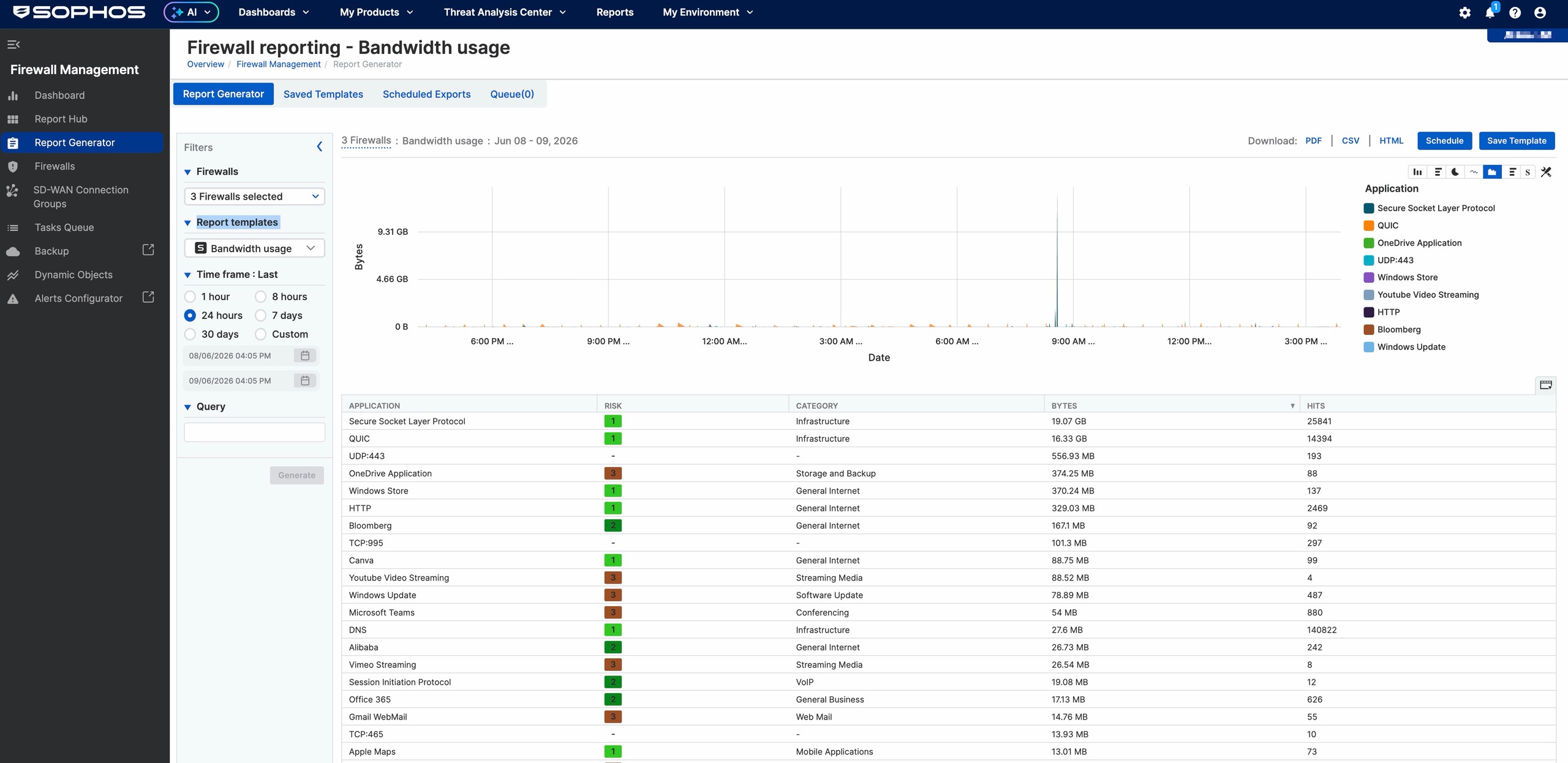
Typical report templates include:
- Antivirus
- Bandwidth usage
- Cloud app risks and usage
- Firewall
- IPS
- Log viewer and search
- SD-WAN
- SD-WAN SLA trend
- SD-WAN bandwidth usage
- Security posture assessment
- Synchronize app
- Threat geo activity
- Threats and events blocked
- VPN usage
- Web usage
- Web user risks
- X-Ops
- Zero-day protection
The retention period depends on the license:
- Active Firewall Subscription: Up to 7 days For basic reports and short reviews
- Xstream Protection / Central Orchestration: Up to 30 days Depending on bundle and permission
- Central Firewall Reporting Advanced: Up to 365 days 100 GB additional storage per license
The exact activation and log selection are described in detail in the article Activate Central Firewall Reporting.
Synchronized Security and Security Heartbeat
When Sophos Endpoint and Sophos Firewall are operated together via Sophos Fusion, Synchronized Security can be used. In this case, the firewall and endpoint exchange security information.
Examples:
- The firewall sees the Security Heartbeat of endpoints.
- Devices with a red heartbeat can be automatically restricted.
- Network and endpoint views are better connected.
- In incidents, it is quickly visible which user or device is affected.
This is one of the greatest added values when, in addition to the firewall, Sophos Endpoint, MDR, or XDR is also used.
Security Heartbeat can also send the Windows domain identity of a managed endpoint to the firewall. Set up Synchronized User ID Authentication explains the safe pilot, rule, and HA workflow.
Validate Security Heartbeat after Registration
A firewall visible in Sophos Fusion does not yet prove that Security Heartbeat is working for the endpoints. It requires a Sophos Fusion account, at least one Sophos Fusion-managed endpoint with a trial or full license, and a valid Network Protection subscription on the firewall. When the firewall is registered, SFOS automatically enables Security Heartbeat and Synchronized Application Control.
A single managed pilot endpoint is suitable for a controlled initial validation:
- Under
System > Sophos Central, check that the firewall is registered and Security Heartbeat is active. - In Sophos Fusion under
My Products > Firewall Management > Firewalls, confirm the alert A new firewall has been successfully registered to Sophos Central. This alert proves registration, but not yet the effect of a rule. - For the pilot endpoint in Sophos Fusion, check the tenant, current health status, and events from the same period.
- Under Control Center > User & device insights > Security Heartbeat, check whether the Connected counter is consistent with the expected pilot status. According to Sophos, the detailed view remains empty when all endpoints are green; it only lists red and yellow endpoints individually.
- Check the firewall rule that actually matches. Without a configured heartbeat condition, the status is only visible; access is affected only by the settings under Configure Synchronized Security Heartbeat.
- Only after establishing this baseline, enable a heartbeat condition in a narrowly scoped pilot rule, turn on logging, and test allowed traffic with a healthy endpoint.
A red status should not be created for this test by disabling or tampering with endpoint protection. If Central, Control Center, and the rule effect do not match, or Missing appears, systematically troubleshoot Missing Heartbeat alerts by zone, path, Rule ID, and logs.
What Sophos Fusion Does Not Replace
Sophos Fusion is helpful but does not replace proper firewall configuration.
Central does not replace:
- Proper zone and interface planning
- Restrictive firewall rules
- Device Access Hardening
- MFA for admins and portals
- Local troubleshooting with Log Viewer and Packet Capture
- Documented backups and recovery tests
- An external Syslog system if compliance or long retention is required
Sophos Fusion is thus an additional management and reporting layer, but not a shortcut for a secure basic configuration.
Check Before Registration
Before connecting to Sophos Fusion, you should briefly clarify what you want to achieve with the registration. This prevents unclear responsibilities, duplicate tenants, or unnecessarily activated services later.
Important preliminary questions:
- In which Sophos Fusion tenant should the firewall be registered?
- Who has the required rights in the tenant for firewall management, reporting, backup, and licensing?
- Is the firewall already registered in another Central account?
- Does the firewall have an active paid subscription other than Base Firewall or an active Sophos support license that includes Central Firewall Management, such as Enhanced Support? Check the actual license, not just whether a support contract exists.
- Does the firewall have working IPv4 internet connectivity?
- Should Central be used only for licence overview and inventory, or also for management, reporting, and backups?
- Are firewall groups used, and have the roles for admin, helpdesk, and read-only access been tested in practice?
- May firewall logs be sent to Sophos Fusion from a data protection or compliance perspective?
- Is there a current local backup and a documented Secure Storage Master Key?
- Is it clear who checks alerts, reports, and failed tasks after registration?
If the firewall is already in the wrong account, you should first check Transfer Sophos Firewall to another Sophos Fusion account. For classifying the different accounts and portals, Sophos Portals: SophosID, Central, Support, and Firewall Access is helpful.
When You Don’t Need to Connect the Firewall
A connection to Sophos Fusion is not strictly necessary if:
- Only a single firewall is managed locally
- No Central reports are needed
- No Sophos Endpoint integration is planned
- Cloud management is not desired for organizational reasons
- Logs are already sent to your own SIEM or a Syslog server
In such cases, you can operate the firewall locally. It is then important to organize backups, firmware updates, monitoring, and logging properly elsewhere.
When Sophos Fusion is Recommended
Sophos Fusion is particularly recommended if:
- Multiple firewalls are managed
- Admins work from different locations
- Firewalls should not be directly accessible via WebAdmin from the internet
- Configuration backups should be stored centrally
- Firewall reporting is needed
- Sophos Endpoint, MDR, XDR, or other Sophos Fusion products are in use
- Security Heartbeat and Synchronized Security should be used
Activate Connection
The connection is set up on the firewall under System > Sophos Central.
The following paths and field names have been checked for SFOS 22.0. A local firewall administrator needs access to this menu. The same prerequisite applies to Central Firewall Management: an active paid subscription other than Base Firewall or an active Sophos support license that includes this entitlement, such as Enhanced Support. Base Firewall alone is insufficient, and the internet management path only works over IPv4.
Before generating an OTP: The firewall must already be configured and claimed in the intended Sophos Fusion tenant. If setup or claiming is still incomplete, first follow Set up Sophos Firewall, claim it, and activate licenses and verify the device and license assignment. The subsequent OTP registration connects the existing firewall for Central Management; it neither claims ownership nor activates subscriptions. Assigning the firewall to a customer as a partner does not replace claiming either.
There are two typical registration methods:
- OTP from Sophos Fusion: Useful when a partner, project team, or firewall admin shouldn’t work with Super Admin credentials for the Central tenant on the firewall. In Sophos Fusion, the existing firewall is added under My Products > Firewall Management > Firewalls > Add Firewall using the serial number, and an OTP is generated.
- Sophos Fusion credentials: Useful when registering directly on the firewall with a suitable Sophos Fusion admin account. Sophos refers to this as a Central Super Admin.
For HA pairs, work carefully. With OTP registration, both serial numbers are entered in Sophos Fusion; for new HA pairs, the OTP is used on the Primary device.
The complete OTP path is My Products > Firewall Management > Firewalls > Add Firewall > Join a firewall that is configured or deployed > Register using OTP > Copy OTP and Finish. The OTP is valid for 14 days; enter both HA serial numbers separated by a comma. Registration with credentials requires a Central Super Admin. Accounts from a Sophos Fusion Enterprise sub-estate aren’t supported for this. A partner must first assign the firewall to the correct customer in Partner Dashboard and open that customer’s Sophos Fusion Admin console.
Typical procedure on the firewall:
- Log in to the firewall.
- Open System > Sophos Central.
- Select Register.
- Select Use OTP or Use email address.
- Enter the OTP or Sophos Fusion credentials.
- Complete the registration.
- Turn on Sophos Central services.
- Select the required services.
Depending on the need, these options can be activated:
Use Sophos Central reporting/Send reports and logs to Sophos Central: Sends log and report data to Sophos Fusion.Use Sophos Central management/Manage from Sophos Central: Allows management access through Sophos Fusion.Send configuration backup to Sophos Central: Stores configuration backups in Sophos Fusion. In practice, this option is tied to the Central Management setup and must be approved in Sophos Fusion.
Only the functions that are actually used should be activated. In environments with data protection or compliance requirements, clarify beforehand which log data may be sent to Sophos Fusion.
After activating the services, an account with the Super admin role in the affected Sophos Fusion tenant must accept the services in Sophos Fusion:
- Sign in to Sophos Fusion.
- Open My Products > Firewall Management > Firewalls.
- Find the firewall with Approval Pending.
- Select accept-services.
- On the firewall, check whether the status changes from Waiting for approval from Sophos Central to Managed or connected.
The status change can take a few minutes. If the display doesn’t change immediately, don’t register repeatedly. First check Central status, internet connectivity, DNS, and time.
If an egress filter is in front of the firewall, the matching outbound Sophos services and ports for Central, reporting, and backups must also be reachable.
Safely narrow down a blocked registration
When the status is Approval Pending or Waiting for approval from Sophos Central, don’t register again or deregister prematurely. First check the correct tenant and serial number, approval by a Super admin in the affected tenant under My Products > Firewall Management > Firewalls, IPv4 internet access, DNS, time, and the required outbound services. For HA, both serial numbers must be entered in Central, and the OTP is entered on the primary. If the status remains stuck after correcting the prerequisites, capture screenshots of both status views, the time, serial numbers, and HA roles for Sophos Support.
Change Central services or deregister
Turning off Security Heartbeat, Synchronized Application Control, or Sophos Central management does not deregister the firewall from Central. However, the services are not independent: turning off Security Heartbeat also disables Synchronized Application Control, and endpoints and the firewall stop exchanging health status information. A Heartbeat pause therefore affects more than a single service.
Before the change, record the previous on/off states of both Security Heartbeat and Synchronized Application Control, as well as the state of the affected service, under System > Sophos Central. Then disable the intended service, save, and check both the affected service states and that the firewall remains registered.
To roll back, restore the affected service and both recorded states, and have a Super admin in the affected tenant accept any renewed service approval in Central. Explicitly check Security Heartbeat and Synchronized Application Control separately rather than assuming that enabling Heartbeat alone restores both correctly. If Heartbeat was previously active, use a managed pilot endpoint to check the current health status and the corresponding Connected counter in Control Center as described above. If Synchronized Application Control was previously active, also verify application recognition under Applications > Synchronized Application Control with the pilot endpoint; Use Application Control in a targeted manner explains the relevant validation workflow.
Complete deregistration is a separate, planned lifecycle step:
- Create a current local configuration backup and keep its password and the Secure Storage Master Key available. Record the tenant, serial numbers, enabled services, firewall groups, pending tasks, reporting, and Central backups. For HA, record both nodes and their roles.
- Test local WebAdmin access with an authorised account. Complete pending Central tasks or record their state and choose a maintenance window. Don’t rely on Central backup files as the only rollback path because they are deleted when the firewall is removed from Central Management.
- On the firewall, open System > Sophos Central and select Deregister. Don’t use undocumented Device Console or Advanced Shell commands as a shortcut.
- Locally verify that the firewall is no longer shown as Central-managed. Under My Products > Firewall Management > Firewalls, check the device object’s state; don’t mistake a remaining object for a working registration. Then verify local access, production traffic, logging, and, for HA, cluster status.
To reverse the change, register the firewall again through the normal OTP or super-admin workflow, have a Super admin in the affected tenant accept the required services in Central, and repeat the service-specific acceptance tests. If Deregister isn’t available, deregistration remains stuck, or the affected scope is unclear for HA, don’t force it through the CLI. Provide the captured state to Sophos Support.
Check After Connection
After registration, you should not only check whether the firewall is visible in Sophos Fusion. It is crucial whether the activated services really work and whether responsibilities are clear.
Useful post-check:
- Check in Sophos Fusion whether the model, serial number, and license status are displayed correctly.
- On the firewall under System > Sophos Central, check whether the desired services are active and connected.
- If Manage from Sophos Central is used, consciously test access via Sophos Fusion once.
- If reporting is active, check in the Log Viewer and in Sophos Fusion whether current events are arriving.
- If cloud backups are active, configure the scheduled backup and document the last successful backup time.
- Check alerts, roles, and responsibilities in Sophos Fusion.
- If changes are distributed via Central, check the Central Firewall Management Task Queue.
Especially with multiple firewalls, the registration should be documented internally: tenant, serial number, location, active Central service, reporting retention, backup interval, and responsible person.
Accept Central Services Separately
After registration, do not only check the global Central status. The individual services have different failure patterns and therefore need separate acceptance tests.
- Registration and inventory: Firewall appears in the correct tenant, serial number, model, license, and location are correct.
- Manage from Sophos Central: Access through Central works with the intended admin role, without WebAdmin unnecessarily remaining open from the WAN.
- Central Reporting: A deliberately triggered event appears in the Report Hub with the correct firewall, time, rule ID, or log type.
- Central Backups: A scheduled or manual backup completes successfully, and backup interval, password, and Secure Storage Master Key are documented.
- Backup retention: The five most recent Central backups and any permanently stored backup are known. For HA, it is clear that the Primary generates the backup.
- Backup alerting: Failed Central backups generate alerts and email notifications that are reviewed by a responsible person.
- Central Tasks: After a Central change, the Task Queue is checked until the task has completed successfully or is escalated cleanly.
- Security Heartbeat: Sophos Fusion shows the expected pilot status, and the corresponding counter in Control Center is consistent with it. Rule-based restrictions are only tested step by step after establishing this baseline.
- Alerts and responsibility: It is clear who regularly checks failed tasks, backup problems, reporting gaps, and license warnings.
This separation prevents a typical operational mistake: a firewall can be visible in Sophos Fusion while reporting, backups, or Central tasks are still not working correctly.
Common Mistakes
Firewall is Registered in the Wrong Central Account
This often happens with service provider changes, test accounts, or multiple historical SophosID accounts. In this case, do not simply attempt a second registration. First, clarify where the firewall currently resides, who has access to the tenant, and whether an account transfer is necessary.
Central Management is Confused with Local WebAdmin
Manage from Sophos Central is an additional access path. The local WebAdmin Console, local admin users, MFA, Device Access, and SSH remain independent security controls. It is especially important that WebAdmin does not remain accessible from the WAN just because Central Management has not yet been tested.
Central View is Not Validated Locally
For group policies, HA clusters, WAF rules, and firmware tasks, Central should not be treated as the only source of truth. Central can show that a change is planned, applied, or visible. What matters is whether the affected firewall has processed the change and whether the real traffic or service works afterwards.
In practice: after Central changes, check the Task Queue, local WebAdmin view, Log Viewer, and, if required, the Audit Trail. If the Central interface only keeps loading, an HA pair appears twice, or a group rule cannot be moved, that is not automatically a firewall rule problem.
Reporting is Activated, but No Usable Data Arrives
Then you should first check whether Send reports and logs to Sophos Central is active, whether the appropriate log types are enabled, and whether the firewall can reach Central. Then check the detailed points on log selection, retention, and reports in the article Activate Central Firewall Reporting.
Cloud Backup is Understood as the Only Backup
Central backups are convenient, but they do not replace a complete recovery plan. For critical locations, it should also be clear where local backups are located, who knows the backup password, whether the Secure Storage Master Key is documented, and how a restore or reimage would proceed.
No One Checks Central Tasks and Alerts
Central only helps if messages and failed tasks are also processed. Especially with group policies, firmware tasks, reporting, and backups, it should be clear who checks warnings and how errors are escalated internally.