
Setting up Sophos DNS Protection with Sophos Firewall
Sophos DNS Protection checks DNS queries through a cloud service and manages policies and reports in Sophos Fusion (formerly Sophos Central). It can block malicious domains, phishing, command-and-control targets, and unwanted categories before a client establishes the actual connection.
With Sophos Firewall, the cleanest standard setup is usually: clients use the firewall as their DNS resolver, the firewall forwards public queries to DNS Protection, and internal domains go to internal DNS servers through DNS Request Routes.
DNS Protection does not replace Web Protection, Threat Feeds, or NDR and Active Threat Response. It complements these controls at the DNS layer.
This guide deliberately stays with Sophos Firewall: it covers the Fusion values, DNS forwarding, Request Routes, DHCP, NAT, acceptance, and rollback. The network setup guide explains the vendor-neutral architecture and firewall allowances; the Locations guide covers the complete Location lifecycle.
Decision and target architecture
DNS is a core service. If the resolver is slow, unstable, or too restrictive, users quickly perceive it as a general network outage. DNS Protection should therefore be used only when the benefits of Fusion policies, categories, logs, or protection for roaming clients justify the additional operational effort.
From Avanet’s perspective, fast, redundant resolvers combined with well-maintained Threat Feeds are the more pragmatic solution for many traditional firewall installations. DNS Protection is particularly suitable when:
- DNS queries need to be visible in Sophos Fusion.
- Locations require different DNS policies.
- Categories should be blocked during name resolution.
- Clients must not use arbitrary public resolvers.
- Managed Windows endpoints also require protection outside the corporate network.
Choose the version first: from SFOS 23.0, use the integrated DoH path with firewall assignment described below. References to public source IPs, DDNS, two static forwarders, and Location assignment describe the Traditional DNS path on SFOS 22 and earlier, not prerequisites for the new firewall path. Endpoint Secure DNS remains separate.
The Traditional DNS path on SFOS 22 and earlier is:
- Sophos Fusion knows the site as a Location.
- Sophos Fusion provides two DNS Protection IP addresses.
- Sophos Firewall uses both addresses as DNS forwarders.
- DNS Request Routes send internal zones to internal DNS servers.
- DHCP distributes the firewall as the resolver to clients.
- An optional NAT rule forces classic DNS traffic onto this path.
- Sophos Fusion logs and evaluates the public DNS queries.
Two methods must be distinguished:
- Traditional DNS over IPv4: for firewalls, routers, and local resolvers. Sophos assigns queries to the Location using the public source IP or a DDNS FQDN.
- Secure DNS: DNS over HTTPS (DoH) for compatible devices. Sophos Endpoint can manage this path on supported Windows endpoints; Windows and macOS can also be configured manually for Secure DNS.
A custom Location can support both methods. For firewall forwarding, Traditional DNS must be enabled and the public IP or FQDN must be stored.
Keep the four DNS paths separate
For troubleshooting, it is essential to know where a query is processed:
- DNS Protection service: The cloud resolver evaluates public queries against the Filtering Policy of the detected Location. Its reports are in Sophos Fusion, not in the firewall’s Log Viewer.
- Firewall as resolver: The client queries a firewall interface IP over UDP or TCP 53. The local DNS function chooses between a DNS Request Route and the forwarders under Network > DNS. DNS must be allowed for the source zone under Administration > Device access. Because this is a local service, a firewall rule cannot grant access to it.
- Transit DNS: If a client queries a public resolver IP directly, the firewall only forwards traffic. A firewall rule applies, but the firewall’s DNS Request Routes do not. A logged firewall rule therefore proves transport, not processing by DNS Protection.
- Endpoint DNS Protection: Sophos Endpoint intercepts supported Windows queries and sends them over HTTPS to the Secure DNS Location. A port 53 NAT rule and firewall Request Routes aren’t in this path. Only excluded domains, or the optional NXDOMAIN retry, use the locally configured DNS resolution.
In the recommended site design, clients use the firewall resolver. Direct transit to the DNS Protection IP addresses isn’t an equivalent substitute when Request Routes must resolve internal zones.
Before rollout, clarify the license, public egress addresses, internal DNS zones, DHCP servers, and ownership of policies and exceptions. Xstream Protection covers standalone DNS Protection for the firewall. Workspace Protection covers DNS Protection for endpoints; Sophos Endpoint must be installed on the devices. Both licenses include DoH.
For DNS Protection to appear as a product in Sophos Fusion, the Xstream-licensed firewall must be linked to the same Fusion account. Check the license under Administration > Licensing on the firewall or on the Firewall Licensing page in Sophos Fusion. Sophos documents three linking methods: registration during installation, claiming the serial number under Firewall Licensing, or enabling Sophos Fusion management in WebAdmin.
License decisions and Fusion permissions belong to the existing Sophos Fusion licensing and administration roles processes. The firewall owner needs access to DNS Protection and the approved tenant values, but should not broaden roles as part of this change.
The predefined Default Location can be used for Secure DNS and assigned policies; it simply cannot be edited or deleted. A maximum of 50 Locations and 100 public IPv4/FQDN entries per Location are supported. Locations should therefore be organised by site and internet egress rather than by every VLAN.
SFOS 23.0: set up and migrate DNS Protection over DoH
From SFOS 23.0, the integrated DNS Protection toggle uses DNS over HTTPS (DoH). The Filtering Policy is assigned to the firewall object, rather than the previous IP/FQDN Location. Requirements are Xstream Protection and registration of the firewall with Sophos Fusion; in HA, both firewalls must be registered. Before switching, record the previous DNS settings, policy assignment, and Location values for rollback.
Before migration: Check whether the existing Location is dedicated to this firewall’s DNS path or is also used by other resolvers or Endpoint Secure DNS. If it is shared, do not remove the Location from its existing Filtering Policy and do not delete it. Carry out the replacement described below only once the policy assignment for the other consumers has been separately clarified and preserved; stop the migration until then.
Enable protection and assign a policy
- On the firewall, enable DNS Protection under Network > DNS.
- Make a deliberate choice about Fall back to DNS server: when enabled, a DNS server must be configured under DNS server settings. Without this option, DNS servers cannot be configured there while DNS Protection is enabled. A third-party fallback resolver improves availability but can bypass DNS Protection filtering and visibility when the service is unreachable. Document the decision and replacement resolver; DoH to an arbitrary provider is not automatically DNS Protection.
- In Sophos Fusion, open My Products > DNS Protection > Policies > Filtering policies. For a new setup, select Add policy, select the firewall under Locations and firewalls > Available, and move it to Assigned to this policy. Type must be Firewall; the name contains the firewall label and serial number. Configure the intended filters under Settings and save the policy.
Replace an existing Traditional DNS assignment
After upgrading and enabling DNS Protection, open the existing Filtering Policy. Under Locations and firewalls, move the Location previously created for this firewall from Assigned to this policy to Available. Then move the firewall from Available to Assigned to this policy and select Save. The old Location may be deleted only after saving. Avanet recommends retaining it until the pilot has passed; do not delete it if other resolvers or devices still need it. This migration does not apply to third-party resolvers or Endpoint Secure DNS.
Validate the pilot and roll back
Clients continue to use the firewall as their resolver. The following DNS Request Route, DHCP, and optional port 53 NAT steps also apply here; do not additionally perform the old Location and static forwarder steps. Under Network > DNS > Test name resolution, enter a public name in Hostname or IP address and select Test connection. Check the server, protocol used, result, and response time. Also test internal names, reverse lookups, and a harmless domain deliberately blocked by the policy from the pilot client. Check the firewall assignment in Fusion and the DNS Protection reports; successful resolution alone does not prove that the Filtering Policy is effective. Do not expand the rollout until the pilot passes. This guide has not been lab-tested on an SFOS 23 firewall.
To roll back, first reassign the retained Traditional DNS Location to its previous policy, remove the firewall assignment, and select Save. Then disable DNS Protection on the firewall and restore the recorded previous DNS configuration under DNS server settings. These are SFOS 23 fields, not the SFOS 22 field names shown below. Keep Request Routes and unchanged client DNS values, then recheck public and internal resolution and filtering. If the Location has already been deleted, recreate it using the recorded values before this rollback.
XML API: documented changes, but no safe copy-and-paste recipe
The SFOS 23 XML API documentation for DNS List adds DNSProtection with Enabled and Fallback, DNSProtocol, DNSOverHTTPS with DNSServer1 to DNSServer3 and URL, IPv4Address, and IPv6Address, as well as FallbackToUnencryptedDns and DNSSecProtection. The raw comments in the example link IPv4/IPv6 settings to UnencryptedDNS and the DoH block to DNSOverHTTPS; for DoH, DNSServer1 is required, and either an IPv4 or an IPv6 address is specified for each server. These documented conditions do not constitute a fully clarified API recipe tested here.
Two conflicts remain unresolved: SFOS 22 names the selector DNSQueryConfiguration with text values. The SFOS 23 table instead names DNS Query Configuration and 0, 1, 2, 3, without showing the XML tag or their mapping in the example. The comment for DNSProtocol both calls the field required and specifies UnencryptedDNS as the value when it is omitted. None of this establishes a tag containing spaces, a numeric mapping, safe omission, automatic compatibility, or a safe default.
Safe current approach: The ambiguous selector/omission recipe is explicitly not offered here. For SFOS 23, use the WebAdmin path described above under Network > DNS, make deliberate protocol and fallback decisions, and check the saved settings, the protocol actually used, the firewall’s Filtering Policy assignment, internal resolution, and filtering effectiveness during the pilot. If automation is required, stop until the vendor provides version-specific clarification of these fields; a working UI does not confirm an XML or REST schema.
DNSProtection/Fallback and DNSOverHTTPS/FallbackToUnencryptedDns are separate settings: the first concerns alternative resolution when DNS Protection is unreachable, while the second concerns falling back from DoH to unencrypted DNS. Loss of protection/visibility and loss of transport encryption are different risks. Do not equate them or adopt unsupported Boolean defaults; explicitly review both decisions. DoH to an arbitrary provider does not mean Sophos DNS Protection, and DNSSecProtection is neither DoH nor a Filtering Policy assignment. No executable global DNS XML is generated from these ambiguities.
XML API: SFOS 22 — DNS List; SFOS 23 — DNS List.
Set up DNS Protection
Traditional DNS on SFOS 22 and earlier: steps 1–3 describe the previous IP/FQDN path. Steps 4–6 also remain relevant to the integrated SFOS 23 path.
1. Create a Location in Sophos Fusion
My Products > DNS Protection > Locations
- Select
Addand enter a unique site name under Name; ideally, use Description to identify the internet egress and owner. - Under Connection method, enable Traditional DNS over IPv4.
- Under IPv4 addresses or FQDNs, enter the public WAN IP or a stable DDNS FQDN. Confirm every value with
EnterorTab. - With multi-WAN, include every egress address that is actually used. Automatically detected firewall addresses aren’t updated automatically after a later change.
- Select
Save.
Private IP addresses are invalid. Sophos must recognise the public source IP through which the query reaches the service. For dynamic addresses, Sophos checks the DDNS name regularly, but a change can still cause a brief interruption. With Cloudflare, the DDNS record must be set to DNS only and must not use the proxy.
With CGNAT or a shared provider IP, the address is assigned to the customer account that registered it first. An FQDN does not solve this issue if it resolves to the same shared IP; a unique public IP is required.

2. Copy the DNS Protection IP addresses
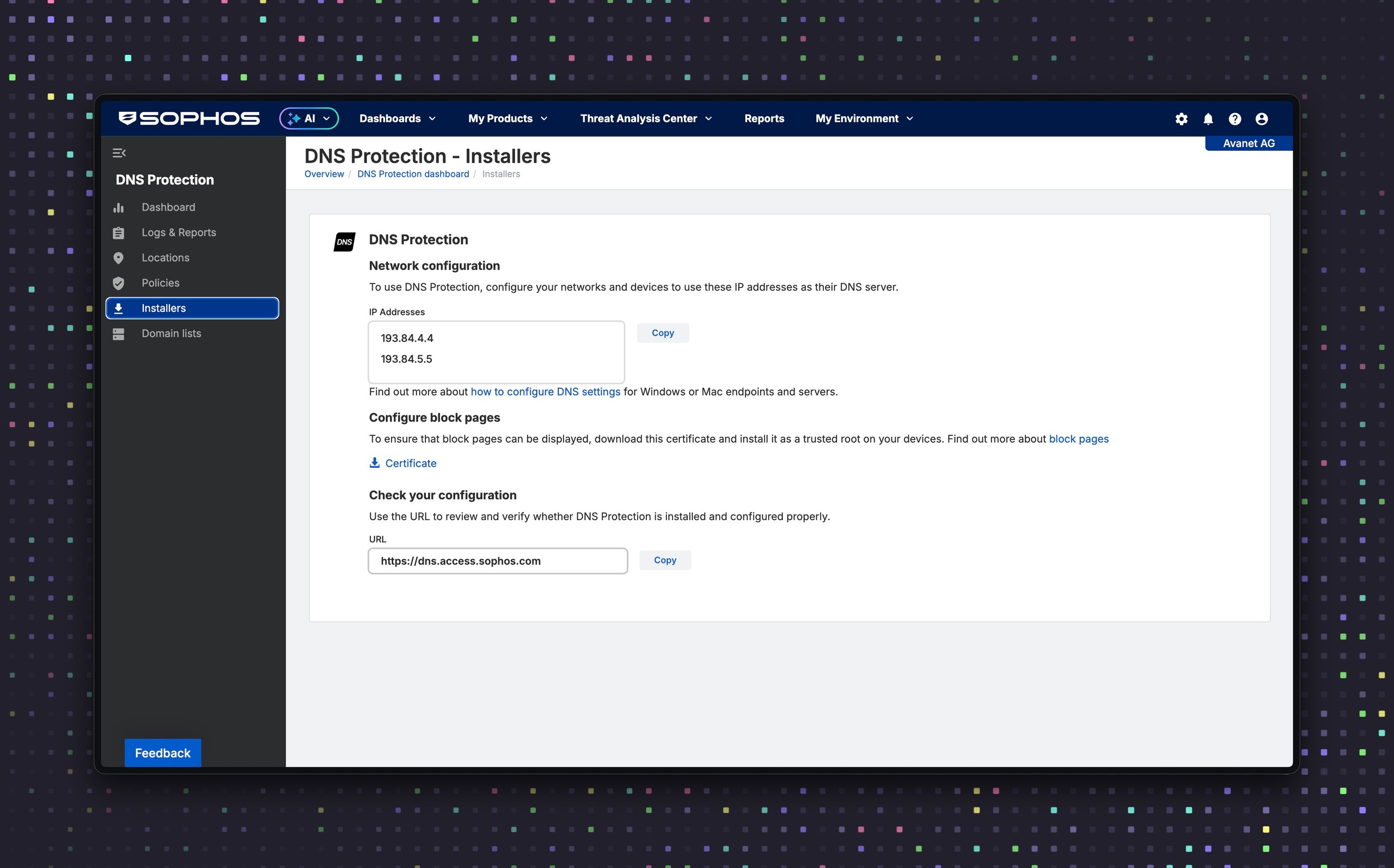
My Products > DNS Protection > Installers
Under Installers, two DNS Protection IP addresses are listed next to IP addresses. Use Copy to copy both values from the organisation’s own Fusion tenant and then use them as DNS 1 and DNS 2. A third-party resolver used as an additional fallback can bypass protection and visibility.
The IP addresses remain available when Secure DNS is enabled. The important point is that Traditional DNS with the public egress address is also configured in the Location for the firewall path.
On the same page, use Copy next to URL to copy the test address. If opening it in a browser displays the DNS Protection welcome message, the resolver path is configured correctly. https://dns.access.sophos.com is particularly useful for later troubleshooting: if only this name fails to resolve, or the browser shows an error instead of the welcome message, this indicates a DNS leak or ISP redirection.
3. Configure the firewall as a DNS forwarder
Network > DNS
- Select
Static DNS. - Set
DNS 1andDNS 2to the two Fusion addresses. - Leave
DNS 3empty unless there is a deliberately documented exception. - Under IPv6, also select
Static DNSand do not enter IPv6 DNS servers. - Enable Choose IPv4 DNS server over IPv6.
- Select
Apply.
The service operates over IPv4 but can also resolve AAAA records and therefore IPv6 destinations. With SD-WAN, failover, or policy routing, the actual egress path must use a public address stored in the Location.
From SFOS 21.5, the DNS Protection status widget in the Control center shows the connection status. The Sophos Assistant is also available for guided setup and troubleshooting. The widget is a quick operational indicator; successful retrieval of the test address and the DNS Protection reports provide stronger acceptance evidence for the complete path.
4. Forward internal domains
Network > DNS
DNS request route > Add
DNS Protection does not resolve internal zones. DNS Request Routes are therefore required for Active Directory, internal applications, and reverse lookups.
Example:
- Host/domain name:
firma.localorcorp.example.com - Target servers: internal domain controllers or DNS servers, in the required query order; each route supports up to eight IP addresses
corp.example.com is a documentation domain and must be replaced with the zone that is actually authoritative internally. Don’t route all of example.com if only one subdomain is internal. When a matching route’s cache lookup fails, the firewall doesn’t also query its public forwarders or root servers. The order and reachability of Target Servers are therefore part of the availability design.
The complete procedure is described in Configure DNS Request Routes on Sophos Firewall. Internally used, publicly registered domains should also be allowed in a Domain List if a category such as Parked Domains blocks them.
5. Point clients to the firewall through DHCP
Network > DHCP
- Under Server, edit the DHCP server for the affected network and note the address of the selected Interface.
- Under DNS server, clear Use device’s DNS settings.
- Enter the firewall’s internal DHCP interface address as Primary DNS.
- Save, renew the lease on a test client, and check the resolver the client actually uses.
Sophos shows the firewall IP as Primary DNS and a DNS Protection IP as Secondary DNS in its example. However, clients do not necessarily treat the second entry as an emergency server only. Direct queries to DNS Protection bypass the firewall’s DNS Request Routes. In networks with Active Directory or internal zones, redundancy should therefore be implemented in the resolver path rather than through an arbitrary second client DNS server.
6. Prevent direct DNS bypass
First, under Administration > Device access, verify that DNS is enabled for every affected source zone. An optional DNAT rule can then redirect classic DNS traffic from internal clients to the firewall:
Rules and policies > NAT rules > IPv4 > Add NAT rule > New NAT rule
- Rule name: for example,
redirect-client-dns-to-firewall - Rule position:
Top - Original source: affected internal networks
- Original destination: outbound host group or
Internet IPv4 - Original service:
DNS - Translated destination: internal firewall IP
- Translated source / Translated service:
Original - Inbound interfaces: only interfaces matching the internal sources, never WAN
Internet IPv4 is broad and is appropriate only when all classic external DNS destinations should be redirected. Keep the source networks and Inbound Interfaces as narrow as possible. Internal DNS servers and special-purpose devices need documented exceptions before this rule. It captures only DNS on UDP/TCP 53. DoH and DoT require separate browser, MDM, endpoint, or Web Policy controls. Test internal name resolution, VPN, and guest networks before activation. The rule mechanics are explained in more detail in Understanding NAT on Sophos Firewall.
Policies, endpoints, and Block Pages
Filtering Policy and Domain Lists
A Filtering Policy is assigned to one or more Locations under DNS Protection > Policies > Filtering policies. Only one Filtering Policy can be active per Location. In addition to categories, Domain Lists and options such as Safe Search can be configured.
For the Traditional DNS path, this article checks the mapping to the correct Location; for the integrated SFOS 23 path, it checks the assignment of the Firewall object to the expected Filtering Policy. The Location mapping and screenshot in this section show the old path. Policy creation, exceptions, Safe Search, piloting, and policy rollback belong in Configure Sophos DNS Protection Filtering Policies.
Domain Lists should have a purpose, owner, and review date. An Allow List overrides normal category decisions, but it does not override classification by SophosLabs as a Threat or Security Risk. An allowed domain can also remain blocked when its CNAME target belongs to a blocked category.

The following decisions are particularly important for categories:
- Infrastructure: normally allow
Content delivery,CRL, andOCSP, because updates and certificate validation may depend on them. - Threats and liabilities: generally block categories such as Phishing, Malware, Newly Registered Websites, or Anonymizers and resolve false positives specifically.
- Data loss: assess cloud storage and webmail according to DLP and compliance requirements.
- Uncategorized: do not block blindly; new legitimate or internal services can temporarily be uncategorized.
- Productivity, social media, and bandwidth: decide by network and business requirements, not as a blanket security rule.
Endpoint DNS Protection
The Endpoint DNS Protection Policy is intended for managed Windows endpoints that also require protection outside the corporate network. Sophos Endpoint intercepts DNS queries and sends them over HTTPS to the Secure DNS Location. The associated Filtering Policy determines the actual filtering.
The Endpoint DNS Protection guide handles configuration, internal Domain Exclusions, and assignment. Firewall NAT, Request Routes, and DHCP are not substitutes for this endpoint path.
The policy currently supports neither Windows Server nor macOS. There is a separate manual Secure DNS profile path for macOS; Linux, mobile devices, and special-purpose devices also require their own network, VPN, or MDM solution. Check the current endpoint package requirements in Sophos Fusion before rollout because they can change at short notice.
Internal zones are explicitly maintained as Domain Exclusions in the Endpoint Policy. This is more reliable than an NXDOMAIN retry and avoids unnecessary external queries. The DNS Protection Root Certificate can be distributed automatically to supported endpoints.
Root Certificate and Block Page
For HTTPS Block Pages, clients must trust the DNS Protection Root Certificate. It is not the same certificate as the firewall CA for TLS Inspection; its distribution is described in Distribute the Sophos Firewall CA certificate for TLS Inspection.
For certificate verification, deployment, rotation, and removal, follow Deploy the Sophos DNS Protection Root Certificate.
The certificate and configuration test are available under DNS Protection > Installers. In addition, blockpage.dnsprotection.sophos.com must be reachable.
In Web Proxy Mode, Pharming Protection can interfere with the Block Page. Before disabling protection globally, allow the Block Page domain through a specific HTTP/HTTPS firewall rule without web filtering and set it to Do not decrypt in a TLS rule.
Pilot, rollout, and acceptance
Location assignment and Location report fields in the following checklist refer to Traditional DNS or endpoint data. For the integrated SFOS 23 path, use firewall assignment and the SFOS 23 pilot checks above instead; do not infer that report or Live Discover field names remain unchanged.
Enable DNS Protection in a small pilot network first. Document internal zones, reverse lookups, and critical services, configure DNS Request Routes, and prepare a clear rollback to the previous resolvers. Server networks require a separate test window because license validation, updates, CRL/OCSP, backups, or cluster communication may depend on DNS.
The following checks must pass before a broad rollout. The client commands here weren’t executed in an SFOS 22 test environment; they are read-only diagnostic commands. The Fusion configuration test and Fusion reports provide the product evidence:
- a public domain is resolved through the intended resolver.
- an internal AD domain and reverse lookup work through DNS Request Routes.
- the configuration test under Installers shows the expected confirmation.
- a harmless domain deliberately blocked by a test policy is blocked and assigned to the correct Location.
- under DNS Protection > Logs & Reports, DNS usage by source shows the Location after the expected reporting delay and, for endpoint data, the user and device as well.
- the guest network uses the planned DNS path but no internal DNS servers.
- the VPN client receives appropriate resolvers and DNS suffixes.
- browser DoH, Private Relay, or local profiles do not unexpectedly bypass the control.
- rollback to the previous resolver has been tested or is clearly documented.
Test commands for clients
Windows:
ipconfig /all
nslookup example.com
nslookup example.com <firewall-ip>
Resolve-DnsName example.com
macOS:
scutil --dns
dig example.com
dig @<firewall-ip> example.com
Linux with systemd-resolved and dig installed:
resolvectl status
dig example.com
dig @<firewall-ip> example.com
Replace <firewall-ip> with the internal interface address of Sophos Firewall. If the explicit query to the firewall works but the normal query does not, the cause is usually DHCP, VPN, browser DoH, or a local DNS configuration. The commands show the client resolver used and its response, but they do not prove by themselves which upstream the firewall uses.
Test an internal zone:
dig @<firewall-ip> interner-host.corp.example.com
This query must reach the internal DNS server through the appropriate DNS Request Route.
Troubleshooting
Location, source IP, and UDP/TCP 53 upstream checks in this section apply to Traditional DNS. For the integrated SFOS 23 path, first check DNS Protection, the firewall’s policy assignment, and the protocol used through Test name resolution. Follow the SFOS 23 pilot checks above; do not additionally enter the old IPv4 forwarders.
Location does not appear in Sophos Fusion
Check the public WAN IP, DDNS FQDN, and the actual multi-WAN egress. A source IP that is not configured can be rejected by the DNS Protection service. For dynamic addresses, check that the FQDN resolves externally to the current IP; Cloudflare records must be set to DNS only.
Invalid FQDNs and IP conflicts appear under My Environment > Alerts. With CGNAT or shared proxy/VPN egress, the first registered Location wins. A different FQDN pointing to the same IP does not change this assignment.
DNS traffic is missing despite a correct Location
This symptom also includes No queries received from locations in the dashboard and DNS Protection: Connectivity Error in the Control center. First open https://dns.access.sophos.com. If the welcome message does not appear, test both tenant addresses shown under Installers over UDP and TCP 53 and verify the actual WAN egress.
If queries reach a different destination or another resolver answers, a router or ISP may be redirecting DNS. A Standard or Extended test at https://www.dnsleaktest.com/ helps narrow this down: with DNS Protection, the values in the Hostname column contain the pattern gw-<Nummer><Region>.dnsprotection.sophos.com; the ISP is shown as Amazon or a corresponding name. If the test shows only other resolvers, ask the provider to investigate DNS redirection. If Sophos and third-party resolvers are mixed, check the DNS settings of the firewall, internal DNS server, and clients, as well as parallel IPv6 resolvers. https://ipleak.net/ can be used as a cross-check.
Keep only the two tenant addresses as firewall forwarders, check routing, NAT, and a packet capture, and resolve ISP redirection with the provider. A third public resolver would only be an unprotected bypass.
Individual clients use a different resolver
Check DHCPv4, DHCPv6, router advertisements, the VPN profile, and static client values together. An additional IPv6 DNS server can route queries around DNS Protection. DNS Protection itself operates over IPv4 but resolves AAAA records, so IPv6 destinations do not require a separate IPv6 resolver.
Internal names no longer work
Check DNS Request Routes, internal DNS servers, reverse zones, search domains, and client suffixes. Also ensure that the client uses the firewall or the intended internal resolver and does not query a DNS Protection IP directly.
Internal or legitimate domain is blocked
Check categorisation, the Domain List, and the CNAME target. A narrow exception is better than opening an entire category. SophosLabs Threat and Security Risk classifications cannot be overridden with an Allow Domain List.
Logs remain empty
Dashboard and reports lag behind real time by approximately 15 to 25 minutes. Updated Location or policy names can take 30 minutes to four hours to appear. Only after that should DHCP, client DNS, firewall DNS, NAT redirection, alternative resolvers, VPN profiles, and Location assignment be checked.
Under DNS Protection > Logs & Reports, start with DNS usage by source and filter by Location, Domain, Status, or Source IP. For directly forwarded DNS, a firewall rule with Log firewall traffic can additionally show whether UDP/TCP 53 crossed the firewall. For the firewall resolver, Administration > Device access is authoritative; a firewall rule isn’t evidence that this local service was allowed or denied.
Filter operators, export limits, delays, and Live Discover are documented in Evaluate DNS Protection Reports and Live Discover. For firewall troubleshooting, prove the resolver path first and only then start deeper report queries.
With EDR, XDR, or MDR, Threat Analysis Center > Live Discover can additionally analyse DNS Protection data such as domain, Policy Action, Location, and source IP. User and device fields are available for endpoint data in the standard reports, not in the documented firewall DNS schema for Live Discover.
Block Page does not appear
Check the DNS Protection Root Certificate, the DNS path, and the reachability of blockpage.dnsprotection.sophos.com. In Web Proxy Mode, also check Pharming Protection, the HTTP/HTTPS rule, and the Do not decrypt TLS exception. VPN, browser DoH, and Apple Private Relay can also route the test around DNS Protection.
For the narrow firewall exception, create an FQDN object for blockpage.dnsprotection.sophos.com. An Allow rule permits HTTP/HTTPS from the affected internal zones and networks to the WAN zone with this object as the destination and no web filtering. A matching TLS rule uses the same selection criteria with Do not decrypt. Do not disable Pharming Protection or TLS Inspection globally instead.
DoH or Private DNS bypasses the control
A NAT redirection for port 53 does not capture DoH or DoT. Browser, operating system, and MDM policies must control such resolvers. Secure DNS in DNS Protection uses DoH; a dedicated DNS Protection mode over DoT is not documented.
On Apple devices, iCloud Private Relay can also bypass the intended DNS path. For example, if iPhones have no internet access while other devices at the same site work, first disable Limit IP Address Tracking for the affected test path and test again. Make an organisation-wide change only after this limited test and after aligning it with privacy requirements.
VPN clients behave differently from LAN clients
Check assigned DNS servers, DNS suffixes, Split DNS, Full or Split Tunnel, and local resolvers. DNS Protection may work in the office but still be bypassed for Remote Access. The basic VPN options are explained in Sophos Connect or SSL VPN: Which Remote Access solution fits?.
Operation
DNS Protection is not a one-time DNS server replacement. Check the following regularly:
- Locations, public egress addresses, and DDNS resolution.
- DHCP settings and internal DNS Request Routes.
- policies, Domain Lists, owners, and review dates.
- top blocked domains and documented false positives.
- new sites, guest networks, VPN paths, and endpoint platforms.
- certificate distribution and reachability of the Block Page domain.
- reports after changes and the defined rollback path.
If these tasks cannot be maintained over time, robust resolvers and targeted security controls are often the better choice. DNS Protection is worthwhile where policies, reporting, and endpoint protection are actually used and monitored.
Roll back safely
The following site rollback applies to the previous Traditional DNS path. For an SFOS 23 migration, use the rollback above involving policy assignment and the DNS Protection toggle.
For the site path, disable DNS redirection first so clients aren’t still forced to the firewall during the rollback. Then restore the previous resolvers under Network > DHCP, renew the test client’s lease, and verify public and internal names. Only after that path works should you restore the previous mode or DNS servers under Network > DNS. Leave Request Routes in place initially; they don’t obstruct the rollback and make a controlled restart easier. Remove the Fusion Location only after no required networks or policies remain assigned to it.
Roll back Endpoint DNS Protection separately: Under DNS Protection > Policies > Endpoint policies, remove the affected assignment or turn off Use Sophos DNS Protection, then verify on the pilot device that system- or application-configured resolvers are used again. The Root Certificate doesn’t need to be removed in the same maintenance window; remove it later through the same managed deployment channel used to install it.