
Understanding NAT on Sophos Firewall: SNAT, DNAT, MASQ, PAT
NAT changes a packet’s addresses or ports. It does not decide whether the connection is allowed, nor does it create a route. For data to flow successfully, the NAT rule, firewall rule, routing, and return path must all align.
The best starting point is therefore not to ask “Which type of NAT do I need?”, but rather: Which address or port should change between ingress and egress? If there is no clear answer, the solution usually lies in routing or the firewall rule, not in NAT.
⚠️ A NAT rule is not an allow rule. If the firewall rule allows the traffic but no NAT rule matches, SFOS forwards the packet without translation. If the corresponding firewall rule is missing, the packet is dropped and logged.
When should NAT be used?
- LAN clients need Internet access: usually SNAT with
MASQ. - An internal service must be reachable through a public address: DNAT; for HTTP/HTTPS, check WAF first.
- The external and internal ports differ: service translation using
Translated service (PAT). - Internal clients use the public name of an internal server: prefer split DNS or use a targeted Loopback Rule.
- Non-overlapping networks communicate over a site-to-site VPN: normally routing and firewall rules without NAT.
- Networks overlap: plan NAT based on the VPN type; do not improvise with a generic MASQ rule.
- Only allow or block access: change the firewall rule; do not create a NAT rule.
For the specific task of publishing a server, Publish a server with DNAT on Sophos Firewall covers the assistant, manual rule creation, hardening, go-live, and rollback. This article explains the NAT model so that you can interpret such rules and troubleshoot issues.
Other closely related special cases include NAT64 with Direct Web Proxy, Proxy ARP for additional public IPv4 addresses, and NAT for IPsec issues.
How to interpret Original and Translated correctly
Under Rules and policies > NAT rules > Add NAT rule, Original describes the packet as it arrives at the firewall. Translated describes the change that SFOS applies to it.
The rule is selected based on these fields:
- Original source
- Original destination
- Original service
- Inbound interface
- Outbound interface
The Translated source (SNAT), Translated destination (DNAT), and Translated service (PAT) fields are results, not additional match criteria. NAT rules are evaluated from top to bottom; the first matching rule wins.
NAT rules are available for IPv4 and IPv6. Select the appropriate address family under Rules and policies > NAT rules before creating a rule; the IPv4 example addresses below do not belong in an IPv6 rule. Add NAT rule > New NAT rule opens manual configuration. New rules are enabled by default. Rule position offers Top and Bottom; you can subsequently change the order by dragging and dropping. Check criteria and position before Save so the new rule does not unintentionally take over production traffic.
Two packet examples
A client at 10.10.10.80 connects through Port2 to 198.51.100.20:443. An SNAT rule can change only the source to MASQ. The destination and service remain Original.
When a service is published, an external client connects to 203.0.113.10:5555. DNAT changes the destination to 172.16.16.10; PAT changes the service to 443. The resulting rule is:
- Original destination:
203.0.113.10 - Original service:
TCP 5555 - Translated destination (DNAT):
172.16.16.10 - Translated service (PAT):
TCP 443
PAT is therefore not a separate address NAT type alongside SNAT and DNAT. It is the port or service translation within a NAT rule.

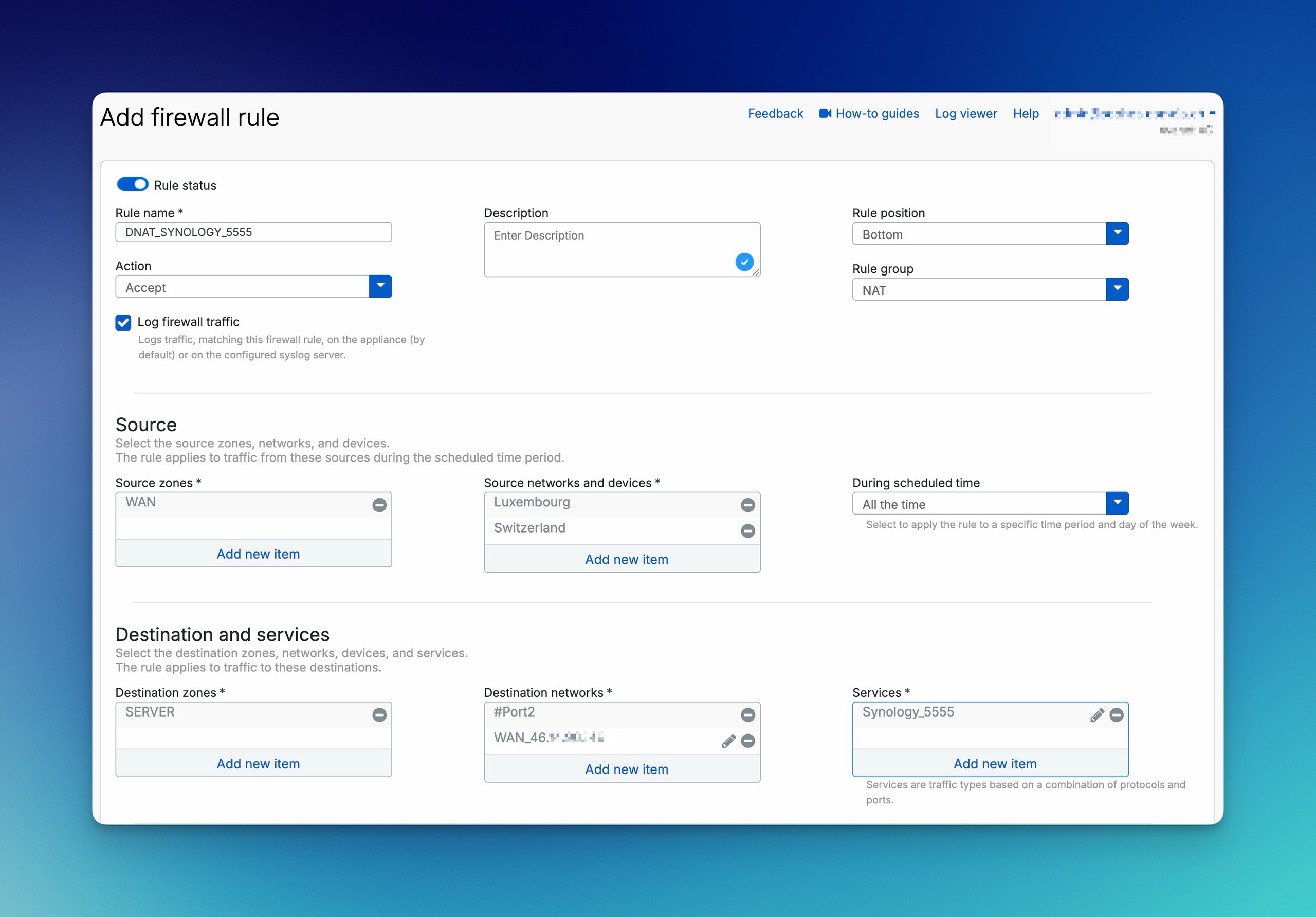
SNAT and MASQ for outbound traffic
SNAT changes the source address. A typical LAN-to-WAN rule uses the internal network as the Original source, the WAN interface as the Outbound interface, and MASQ as the Translated source. The destination and service remain Original or are restricted to the scope actually required.
By default, MASQ uses the address of the outbound interface. The factory configuration includes Default SNAT IPv4 for this purpose. If it is not needed, Sophos recommends disabling it rather than deleting it: it may be recreated when a WAN interface is created or updated.
After a migration from SFOS 17.5 or earlier, an additional disabled default SNAT rule may appear at the bottom of the table. It is intended to replace cleaned-up Linked MASQ rules and must not be confused with an actively used factory rule.
Multiple internal clients or servers can share the same public source IP: SFOS distinguishes their connections using different port numbers. This source-port mapping is not the same as DNAT service forwarding to a server.
Create an independent LAN-to-WAN SNAT rule
An independent SNAT rule can serve multiple firewall rules. First check existing NAT rules, the route, outbound interface, and return path, and save the previous state including IDs and positions. This example permits only HTTPS from the client network to a specific test destination; replace all addresses and interfaces with your own values.
- Open Rules and policies > NAT rules, select IPv4, then Add NAT rule > New NAT rule. Set Rule name, for example
LAN-Web-Standalone-MASQ. ChooseToporBottomunder Rule position, then deliberately drag the rule above more general matching rules; do not blindly put it first. - Set Original source to
Clients_LAN(10.10.10.0/24), Original destination to a host object for198.51.100.20, and Original service toHTTPS. The documentation destination is not a real test server. General Internet access can deliberately use a broader destination scope; keep services limited to those required. - Set Translated source (SNAT) to
MASQ, and both Translated destination (DNAT) and Translated service (PAT) toOriginal. Set Inbound interface to the actual LAN interface,Port2in the example, and Outbound interface to the actual WAN interface,Port1here. Select Save and record the NAT Rule ID. - Under Rules and policies > Firewall rules, select IPv4 > Add firewall rule > New firewall rule if no suitable allow rule exists. Set the name and position, Action
Accept, Source zonesLAN, Source networks and devicesClients_LAN, Destination zonesWAN, Destination networks to the same destination, and ServicesHTTPS. Configure appropriate security settings and Log firewall traffic, then Save. Do not create another Linked NAT Rule. - Establish a new HTTPS connection to your own test destination and close it normally. Compare both Rule IDs in Log Viewer; Packet capture should show the expected WAN source address on egress. For a wrong NAT match, check higher rules first; for missing replies, check routing and the return path. To roll back, disable only newly added rules and restore changed positions; do not remove a shared allow rule. Verify the previous state with a new session.
Create a LAN-to-WAN rule with linked NAT
For a scoped IPv4 allow rule, you can link SNAT while creating the firewall rule. First check whether an existing SNAT rule already translates the flow as required; if so, no additional Linked NAT Rule is needed. The route and return path must be correct independently of NAT.
- Open Rules and policies > Firewall rules, select IPv4, and create a rule through Add firewall rule > New firewall rule. Choose a clear name, such as
LAN-Web-Out, and an appropriate position; set Action toAcceptand enable Log firewall traffic. - Set Source zones to
LANand restrict Source networks and devices to the client network that needs access. For example, use a network object namedClients_LANfor10.10.10.0/24; adapt both the name and subnet to your environment. Set Destination zones toWAN. Under Destination networks, select the required destinations, and under Services, only the required services, such asHTTPSfor this web flow.Anyis not a blanket requirement. Account for DNS and any other necessary services separately. - Select Create linked NAT rule. Give the NAT rule its own name, such as
LAN-Web-MASQ, and an appropriate position. Set Translated source (SNAT) toMASQ: this flow should use the address of the actual outbound interface, while the firewall rule continues to restrict sources, destinations, and services. - Select Save inside the linked NAT configuration first, then select Save again for the firewall rule. Saving only the nested NAT dialog does not complete the procedure.
- Check the firewall rule under Firewall rules and the linked SNAT rule under NAT rules; record both entries and their Rule IDs. Review the order in each table separately. A matching NAT rule above the linked rule can take precedence; linking does not guarantee priority.
- From an allowed client, establish a genuinely new connection to the permitted destination and service, then close the test connection normally so a session log can be generated. Filter for that flow in Log Viewer and compare Firewall Rule ID and NAT Rule ID with the recorded IDs. If the firewall ID is wrong, check firewall criteria and order first; if the NAT ID is wrong, check higher NAT rules first. The presence of both entries alone does not confirm working Internet access.
Important SNAT limitations
Alongside MASQ, Translated source (SNAT) can use a single IP or an IP range. The SFOS 22 description explicitly permits any interface-assigned IP as the source and specifies Add to create an IP/range object. The SFOS 23 description of NAT types still explicitly includes single IPs and ranges; omitted sentences in its Add description do not mean support was removed. The fixed address must be reachable in your environment and compatible with the expected return path.
- A range under Translated source does not create a fixed one-to-one mapping. SFOS uses the next available address in the range.
- A public interface that is a member of a bridge cannot serve as a source NAT interface. If an interface in use is later made a bridge member, SFOS deletes the affected SNAT rules.
- Override source translation for specific outbound interfaces allows one SNAT rule to use different translated sources for different outbound interfaces. Use Expand to add more mappings.
- For route-based VPNs with
Anyas the local and remote subnets, or with a dual-IP configuration,MASQmay use the XFRM address as the inner source. The WAN address remains visible in the outer tunnel header.
Before changing a bridge configuration or modifying production SNAT pools, document the affected rules and then test them using a genuinely new traffic flow.
DNAT, PAT, Loopback, and Reflexive Rules
DNAT changes the destination address. PAT also changes the service or port being addressed. The protocol must remain the same: TCP can be translated to another TCP port and UDP to another UDP port, but TCP cannot be translated to UDP.
If multiple original services or Any are selected, Translated service (PAT) must be Original. An unambiguous port-forwarding rule uses one specific original service and one specific translated service. Translated destination (DNAT) can be an IP address or FQDN. Service translation supports a single destination port or equal numbers of original and translated ports: for example, many ports in one original service to one port (many-to-one), or equally sized port sets (many-to-many). Many-to-many requires equal port counts; multiple separately selected original services do not allow PAT translation. The protocol must always remain the same.
The firewall rule corresponding to DNAT
For inbound traffic, SFOS first determines the matching DNAT rule. It then evaluates the firewall rule. This results in an unusual but important mapping:
- Destination zone: the zone of the internal destination after DNAT, such as
DMZ. - Destination networks: the public destination address before DNAT.
- Services: without PAT, the service being accessed. With PAT, the official Sophos example includes both the original and translated services in the firewall rule.
In the reverse direction, the firewall rule is evaluated first; SFOS then applies the matching SNAT rule.
A NAT rule does not replace this firewall rule. For a complete DNAT setup, including source restrictions, IPS, logging, and an external acceptance test, follow the DNAT runbook.
Loopback Rule
A Loopback Rule can allow internal clients to connect through the public IP address or public FQDN. Split DNS is often more transparent: internally, the same name resolves directly to the server’s internal address, avoiding the need for hairpin NAT.
The Server Access Assistant creates a Loopback Rule only if a firewall WAN interface is selected as the public address and External source networks and devices is set to Any. Entering a public IP address or a more restrictive external source does not create this automatic Loopback Rule.
In manual DNAT configuration, Create loopback rule is a separate option. The underlying DNAT rule must use Original source Any, Translated source (SNAT) MASQ, and a Translated destination (DNAT) other than Original. These are not the assistant’s fields. Do not remove an external source restriction merely to obtain loopback: first consider split DNS or a separately planned internal rule. After saving, test internal access and external restrictions separately.
Reflexive Rule
A Reflexive Rule creates a reverse SNAT rule for a DNAT rule. It reverses the match criteria and can translate outbound server traffic using the corresponding public identity. If the original destination is not an IP address or is translated, the Reflexive Rule uses MASQ as the translated source.
During manual DNAT creation, Create reflexive rule generates this mirror rule; Create loopback rule is independent. Generated rules use the original rule’s ID and name but remain separate. For rollback, identify and disable every generated entry separately, then check with new internal and external connections.
Loopback and Reflexive Rules remain separate rules. Changing or deleting the original DNAT rule does not automatically update or remove them. After changing the public address, internal destination, or service, check the derived rules separately.
If a DNAT rule distributes traffic across multiple internal destinations, SFOS considers them available unless Health check is enabled. A health check is mandatory for First alive; for the other distribution methods, it must be enabled explicitly and configured with ICMP or TCP to suit the service, so that SFOS sends no new traffic to a failed server.
Linked NAT Rules and Server Access Assistant
A Linked NAT Rule is always an SNAT rule linked to a firewall rule. All match criteria from the firewall rule continue to apply, including users and schedules. Only translated sources and interface-specific translated sources can be changed in the NAT rule.
The link does not bypass normal NAT ordering: an independent NAT rule placed higher in the table can match first. If a generic SNAT rule already covers the same traffic, Sophos does not recommend adding a Linked NAT Rule. In MTA mode, however, SFOS creates one automatically.
The Server access assistant (DNAT) creates a DNAT rule, a Reflexive Rule, and a firewall rule. It adds a Loopback Rule only for the previously described combination of a WAN interface and the external source Any. The assistant places the rules at the top of the tables and enables them. You must then check the sources, rule position, additional generated rules, and alias IP use. For an alias IP, the assistant initially sets the physical interface as the translated source in Reflexive or Loopback Rules; if the alias address should be used, you must manually select a corresponding IP Host.
Distinguishing NAT, VPN, and SD-WAN
NAT does not change a routing decision. Even after translation, SFOS needs a route to the destination. For VPN traffic, the correct place to configure translation also depends on the tunnel type:
- Policy-based IPsec: use the NAT settings of the IPsec connection to translate the local and remote subnets, especially when they overlap. If an additional SNAT rule must match policy-based traffic, set its Outbound interface to
Any; it does not apply when specific WAN interfaces are selected. - Route-based IPsec with selected local and remote subnets: use the NAT settings of the IPsec connection to translate these subnets.
- Route-based IPsec with
Any/Any: use NAT rules for the forwarded traffic.
For VPN traffic in NAT rules, set Inbound interface to Any. For VPNs and DNAT translating public to private IP addresses, Outbound interface must also be Any. This is an interface matching requirement, not permission for arbitrary sources or services; Original criteria and firewall rules still restrict them.
Non-overlapping networks generally do not require NAT. For overlapping networks, document the real and translated networks on both sides; otherwise, DNS, rules, and logs become ambiguous later.
For DNAT to a server behind a route-based IPsec tunnel, Sophos documents a special SD-WAN setup: the DNAT rule uses MASQ as the Translated source so that replies return to the firewall. The SD-WAN route matches the original WAN address or WAN interface as its destination and, when PAT is used, the external port. The gateway object points to the XFRM interface. Do not apply this special case to local servers as a general DNAT pattern.
Reach a remote server using DNAT and an SD-WAN route
This IPv4 procedure applies only to a server behind the remote firewall. First check route-based IPsec connections on both firewalls, tunnel status, remote reachability, allowed sources, service, return path, and existing NAT/SD-WAN order. Save the configuration and affected positions. The example uses external TCP 5555 and internal TCP 443, not public RDP; replace documentation addresses with your own values. A separate firewall allow rule and hardening remain necessary.
- Under Hosts and services > IP host > Add, create
Remote_Web: IP versionIPv4, TypeIP, IP address the remote server’s address, for example172.16.16.10; select Save. - Under Routing > Gateways, IPv4 gateway > Add, choose a clear name. Set Gateway IP to the remote gateway address, for example
10.12.13.2, and Interface to its XFRM interface, for examplexfrm1-10.12.13.1. Under Monitoring condition, enter the IP address of a genuinely reachable host behind the gateway; check gateway/tunnel status before publishing. - Under Rules and policies > NAT rules > Add NAT rule > New NAT rule, create a named IPv4 rule. Restrict Original source to authorized external sources. Set Original destination to the published WAN interface, such as
#Port1, Translated source (SNAT) toMASQ, Translated destination (DNAT) toRemote_Web, Original service to aTCP 5555service object, and Translated service (PAT) toTCP 443. Set both interface fields toAnyfor this VPN DNAT case. Review the position and select Save. In this special case,MASQprovides the return path to the firewall. - Under Routing > SD-WAN routes, select IPv4 > Add and enter a name. Under Destination networks, remove
Anyand select the same original WAN interface#Port1, notRemote_Web. Under Services, removeAnyand select the external serviceTCP 5555, notTCP 443. Under Link selection settings, choosePrimary and Backup gatewaysand set Primary gateway to the remote gateway; select a backup only if its remote path actually exists and has been checked. Select Save. - Establish a new connection from an authorized external source. Check NAT/firewall IDs, translated destination and service, XFRM egress, and replies in the capture. For wrong egress, check SD-WAN criteria, order, and gateway monitoring; for missing replies, check the remote service and return path. For additional servers using the same gateway, extend the same SD-WAN route with their external ports/WAN addresses; use separate routes for different gateways. Newly included combinations must remain restricted by NAT and firewall rules.
If the change fails, disable the new remote DNAT rule, remove the new SD-WAN route or restore its previous configuration, and restore positions. Do not delete shared gateway/host objects. Roll back derived NAT rules separately and verify the previous flow with a new connection.
Translating firewall-generated traffic with sys-traffic-nat
NAT rules in WebAdmin translate forwarded traffic. For traffic generated by the firewall and for translating firewall interface addresses, use sys-traffic-nat in the Device Console.
Typical reasons to use CLI source translation include:
- Sending firewall-generated DHCP and authentication requests through site-to-site IPsec; translation can also support requests to firewall services through VPN tunnels. It does not replace service and VPN configuration.
- Using alias addresses when WAN links outnumber physical WAN interfaces, translating the physical interface to the appropriate alias.
- Sending mail traffic with the alias source address required by an upstream relay or MX record.
- Hiding internal addresses from WAN destinations, such as DHCP requests from a LAN interface; using a specific source identity for internal MPLS destinations or selected web servers.
Record the destination, required source identity, route, and peer requirements beforehand. Afterwards, trigger the actual service again and check the source address and reply in the capture. A CLI entry alone proves neither DHCP, authentication, nor mail flow.
The following example translates traffic to the single destination 192.0.2.10 that leaves through Port1 so that it uses the alias address 203.0.113.10:
show advanced-firewall
set advanced-firewall sys-traffic-nat add destination 192.0.2.10 netmask 255.255.255.255 interface Port1 snatip 203.0.113.10
show advanced-firewall
The destination, netmask, interface, and SNAT address must match your environment. For a single host, 255.255.255.255 is required; a broader mask matches the entire corresponding destination network. Without interface, the entry applies to traffic through any firewall interface to the specified destination.
⚠️ This Device Console command changes system-generated traffic. First, save the complete output of
show advanced-firewall. CLI NAT entries are processed in the order shown there.
To roll back the change, use the same complete mapping with delete:
set advanced-firewall sys-traffic-nat delete destination 192.0.2.10 netmask 255.255.255.255 interface Port1 snatip 203.0.113.10
show advanced-firewall
By default, system-generated traffic uses WAN Link Load Balancing. With an alias IP, the main interface remains decisive for the routing decision; sys-traffic-nat only ensures that the required alias address appears as the source. A visible entry therefore confirms the configuration, not the route, return path, or service.
Changing and testing NAT rules safely
Use the table and counters deliberately
Under Rules and policies > NAT rules, IPv4 or IPv6 selects the rule family. Disable filter hides the rule filter, Enable filter shows it, and Reset filter resets it. Hiding a filter does not disable a NAT rule. Ensure the correct entries are visible before changing anything.
Selected rules can be turned off together using Disable, or removed using Delete. Drag the Rule handle to move a rule; specific rules belong above general ones. More options provides the on/off switch, editing, deletion, and insertion of an adjacent rule. Unlink rule removes the link to the firewall rule; document that dependency first and do not use unlinking as a diagnostic shortcut.
Reset usage count under More options resets the usage counter. Record the counter and time first, then generate a new test flow and check the increase alongside Rule IDs; a counter alone does not identify the test flow. The previous counter value is not restored. Before rule changes, save IDs, criteria, status, and order, preferably disable rather than delete, and change only selected entries. If problems occur, restore status and positions and test with a new session; a deleted rule must be recreated from the saved configuration.
SFOS evaluates NAT only for the first packet of a connection. Existing sessions retain their previous translation when a rule is changed or moved. A post-change test must therefore create a new connection; otherwise, you may be assessing the old state.
A reliable test starts with a documented flow: source, destination, service, inbound and outbound interfaces, and the expected Firewall Rule ID and NAT Rule ID. Then follow these steps:
- Create a new connection and filter by source, destination, and service in Log Viewer.
- Compare the expected Firewall Rule ID and NAT Rule ID.
- If the NAT Rule ID is wrong, check the rules above it, all
Originalfields, and the interfaces. - Under Diagnostics > Packet capture, verify that the packet arrives and is forwarded with the expected addresses.
- Check the route, return path, destination system, and its local firewall.
For DNAT, at least one test must be performed from outside the network. Internal access to the public name tests only split DNS or loopback, not the actual publication from the Internet.
Interpreting findings correctly
- Firewall Rule ID and NAT Rule ID are correct: matching is correct; next investigate the destination system, return path, and Security Profiles.
- Firewall Rule ID is correct, NAT Rule ID is wrong: another NAT rule takes precedence, or the
Originalcriteria do not match. - No NAT Rule ID although translation is expected: no NAT rule matches; if the firewall rule allows the flow, it continues without translation.
- Different Firewall Rule ID: check zones, networks, service, and firewall rule order.
- No log entry: logging is disabled or the traffic does not reach the firewall. Capture on the WAN or inbound interface and check upstream routers or cloud rules.
- DNAT matches, but the server does not respond: check the server service, local firewall, default gateway, and asymmetric return path.
For deeper analysis, see Test a firewall rule, Investigate rule matching, Classify dropped packets, and Packet Capture in WebAdmin.
FAQ
Does a NAT rule automatically allow traffic?
Why has a changed NAT rule not taken effect in my test?
When should I use MASQ instead of a fixed SNAT IP address?
MASQ is suitable for normal outbound traffic that should appear with the address of the selected outbound interface. A fixed SNAT address is required when a server or partner expects a specific public source address.