
Publishing a Server via DNAT on Sophos Firewall
With DNAT you publish an internal server via a public IP address or port. The Sophos Firewall then forwards incoming traffic to the internal destination server. Typical examples are web servers, reverse proxies, VPN gateways or other services in a DMZ.
For the broader hardening context, use the hub Sophos Firewall Hardening: best practices for secure configuration.
This article explains what to check before and after creating a DNAT rule and how to secure the publication as tightly as possible.
Planning before publishing
Before publishing a service with DNAT, determine whether it really needs to be publicly accessible and which technical option fits best. Good planning prevents unnecessary open ports, duplicate NAT rules, and difficult-to-trace return paths.
Requirements
- Public IP address or WAN interface
- Internal server with fixed IP address
- Known service and port, for example TCP 443
- Appropriate firewall rule
- Optional: IPS, Web Server Protection or Reverse Proxy depending on the service
⚠️ DNAT publishes an internal service to the outside world. Every published service increases the attack surface. Only what is really necessary should be published. Source, port and destination should be as narrow as possible.
Clarify in advance
Before setting up the control system, you should answer these questions:
- Which public IP or WAN interface is used?
- Which external port should be accessible?
- Which internal IP is forwarded to?
- Does the port stay the same or is it translated?
- Should access be allowed from everywhere or only from certain source networks?
- Does Source NAT or Reflexive NAT need to be taken into account?
- Is there a need for a loopback rule for internal clients using the public FQDN?
- Will only one internal server be published or multiple servers with load balancing?
- Is there already a rule that uses the same port?
- Is the Sophos Firewall located directly on the Internet or behind a provider router?
- Do additional rules need to be opened in a Cloud Security Group?
This information prevents later conflicts with existing NAT or firewall rules.
If the terms Original source, Original destination, Translated destination, Translated service, Loopback or Reflexive Rule are still unclear, you should first read Understanding NAT on Sophos Firewall: SNAT, DNAT, MASQ, PAT. This page focuses on the specific publication of an internal service.
DNAT, WAF, VPN or ZTNA?
Not every publicly accessible service should be automatically published via DNAT. DNAT is technically simple, but also very direct: the firewall forwards a port to an internal destination. Whether this makes sense depends on the service, the sources and the need for protection.
- Non-HTTP service with clearly defined sources: DNAT with tight source restriction, logging and IPS.
- Public HTTP or HTTPS application: first check Sophos Firewall WAF.
- Admin access such as SSH or RDP: For individual fixed targets, use Clientless SSL VPN; otherwise, use VPN, ZTNA, or a fixed source IP instead of open DNAT.
- Access only for a few partners or locations: Prefer source IP, VPN or site-to-site connection.
- Application should be accessible internally and externally under the same name: Check split DNS or deliberately planned loopback rule.
For classic web applications, WAF is often a better starting point because hostnames, certificates, paths, web protection profiles and optionally authentication can be taken into account. DNAT should only be used for administrative access in exceptional cases. If an internal service doesn’t really need to be public, VPN or a ZTNA architecture are usually a cleaner solution. The existing ZTNA basics are available in How to set up Sophos ZTNA and Create Sophos ZTNA Gateway.
If the firewall is behind a router
DNAT also works if the Sophos Firewall does not directly have the public IP address, but is behind a NAT router from the provider.
In this case two redirects are needed:
- On the provider router, the public port is forwarded to the WAN IP of the Sophos Firewall.
- On the Sophos Firewall, the port is forwarded to the internal server via DNAT.
Many provider routers offer classic port forwarding or a function such as Exposed Host or DMZ Host. With an exposed host function, many or all incoming ports are often forwarded to the firewall. This can be practical, but should be carefully secured because the actual control then lies entirely with the Sophos Firewall.
If there is no fixed public IP, you can use DynDNS. Sophos Firewall can set up Dynamic DNS so that a DNS name always points to the current public IP. It is still important: The port forwarding on the provider router must point to the Sophos Firewall.
With an additional public IPv4 address on a directly connected WAN segment, the upstream ARP resolution may still be missing. Only when a capture proves the request and the missing firewall reply does the separate Proxy ARP configuration on Sophos Firewall workflow apply; DNAT does not require this manual step in every case.
The same principle applies in cloud environments. With Azure, the DNAT rule on the Sophos Firewall alone is not enough. In addition, the appropriate Inbound rules must be opened in the Network Security Group, otherwise the traffic will not reach the firewall at all.
Configure DNAT and firewall rule
A server publication always consists of two parts: the NAT rule translates the destination or port, the firewall rule allows and controls the traffic.
Server Access Assistant or manual DNAT rule?
Sophos Firewall offers two ways to publish servers:
- Server access assistant (DNAT): Suitable as a quick standard option for a single publication. The assistant creates several rules automatically and places them at the top of the rule base.
- Manual DNAT rule: Suitable for more complex environments with an alias IP, PAT, load balancing, specific sources, or a deliberate rule design. Each field must be set and tested individually.
The wizard can be helpful because it not only creates an incoming DNAT rule, but depending on the selection it also creates a loopback rule, a reflexive SNAT rule and the appropriate firewall rule. This saves time, but is no substitute for checking the rules created.
⚠️ DNAT and weighted load balancing can’t be configured simultaneously for the same DNS host entry. If this DNS host is already used for weighted distribution, plan the two requirements separately before publication; the assistant doesn’t combine both functions in a single rule.
Use Server Access Assistant
The assistant is the fastest way to create a first publication. It is especially useful when a single internal server should be reachable through a WAN address and a clearly defined service.
Create any required custom service objects before starting. Selecting Services does not configure port translation: Translated source (SNAT) and Translated service (PAT) initially remain Original in the generated DNAT rule. For PAT, edit the generated NAT rule after saving and check the PAT fields and matching firewall rule. After the edit, its services and other matching criteria must fit the NAT rule again. Entering a public IP under WAN IP address sets the generated DNAT rule’s Inbound interface to Any; this is not the same as deliberately selecting a WAN interface. Do not broaden external sources to Any just to obtain an automatic loopback rule.
Procedure:
- Open Rules and policies > NAT rules.
- Select IPv4 or IPv6.
- Select Add NAT rule > Server access assistant (DNAT). Alternatively, you can start the assistant under Rules and policies > Firewall rules > Add firewall rule.
- Under Internal server IP address, select the internal server or enter an IP address.
- Under WAN IP address, select the WAN interface or public IP address.
- Under Services, select the internal service, for example
HTTPS. - Under External source networks and devices, set the allowed sources. For public services,
Anyis only suitable if the service really must be reachable from the entire internet. - Review the rules and save with Save and finish.
The assistant activates the generated rules directly and places them at the top of the NAT and firewall rule tables. That is exactly why a review belongs after saving. An automatically generated rule can work technically and still be too broad, placed too high or poorly named for operations.
For the assistant to generate a loopback rule automatically, two conditions must be met: select a firewall interface as the WAN destination and set External source networks and devices to Any. The assistant does not create a loopback rule when you enter a public IP address or restrict the external sources. In many environments, Split DNS is clearer than loopback NAT anyway.
After using the assistant you should always check:
- Are NAT and firewall rules in the correct position?
- Is the source really as narrow as planned or is it still at
Any? - Was a loopback rule created even though Split DNS would be a cleaner solution?
- Was a reflexive rule created that is not needed for outgoing server traffic?
- Does the firewall rule match the target zone after NAT and the public target object before NAT?
For productive environments, a manually named and deliberately placed DNAT rule is often easier to understand. The wizard is good for a quick start, but the rules created belong in the same review as manually created rules.
Create DNAT rule
A typical manual DNAT example publishes external TCP 443 to an internal web server in the DMZ. The rule only translates the destination address and, optionally, the destination port. It does not replace a firewall rule.
Procedure:
- Open Rules and policies > NAT rules.
- Select IPv4 or IPv6.
- Select Add NAT rule > New NAT rule.
- Set a descriptive Rule name, for example
DNAT_WEB_DMZ_HTTPS. - Choose the Rule position so that specific DNAT rules appear before general rules.
- Set Original source to the permitted external sources. Only use
Anyfor services that are deliberately public. - Set Original destination to the WAN host object, the public IP address, or the appropriate WAN interface.
- Set Original service to the service reachable from outside, for example
HTTPS. - Set Translated destination (DNAT) to the internal server or server group.
- Leave Translated service (PAT) at
Original, or set the internal destination port when port forwarding is required. - Set Inbound interface deliberately. For internet access, this is usually the WAN interface; special cases may require
Any. - For DNAT to internal servers, normally leave Outbound interface at
Anyso that routing and the destination zone are evaluated correctly. - Only enable loopback, reflexive rule, load balancing, and health check when they are functionally required.
- Save and enable the rule.
If only a few external source IP addresses need access, Original source should not be Any, but should be restricted to those sources.
For production publications, a host object for the public IP is usually clearer than selecting a WAN interface directly. The object remains traceable if interfaces, alias addresses, or provider details change later.

Understand Original and Translated correctly
When it comes to NAT rules, the distinction between Original and Translated is important.
- Original source / destination / service describes the traffic as it arrives at the Sophos Firewall.
- Translated source / destination / service describes the traffic as it leaves the Sophos Firewall after translation.
For an incoming DNAT rule this means:
- Original destination is the public IP or WAN address of the firewall.
- Original service is the external port that the client addresses.
- Translated destination (DNAT) is the internal server.
- Translated service (PAT) is the internal port on the target server if the port is to be translated.
- Translated source (SNAT) usually stays at Original with normal DNAT rules.
Port forwarding and PAT
Port forwarding is technically a service translation. On the Sophos Firewall, Translated service (PAT) is used for this.
Example:
- External: TCP
20120 - Internal: TCP
22
The external client connects on port 20120, but the Sophos Firewall internally forwards on SSH port 22. This can be useful, but it does not replace access restrictions. Changing the external port may reduce some background noise, but it does not make a service secure.
Important: The protocol must remain the same. TCP can be translated to another TCP port, UDP to another UDP port. TCP to UDP is not a valid port translation.
If HTTPS is published, you also need to check whether there are conflicts with WebAdmin or User Portal of the Sophos Firewall. By default, the admin console uses HTTPS port 4444, the user portal uses HTTPS port 443. If there are overlaps, the firewall’s own ports or the published services must be clearly separated.
Plan source IP and return path consciously
For a normal DNAT publication, Translated source (SNAT) should usually remain at Original. The internal server then sees the actual external source IP. This is important for server logs, rate limits, Fail2Ban-like protection mechanisms, application logs, WAF or reverse-proxy analysis, and later incident investigation.
SNAT to the firewall or an internal address may still be necessary if the return path does not otherwise go through the Sophos Firewall. This is possible, for example, if the published server uses a different default gateway, is in a foreign routing segment, or has an asymmetric routing situation.
The decision should be made consciously:
- Source remains
Original: Server sees real external IP. The return path must run cleanly through the firewall. - Source is translated via SNAT: The return route is easier to control. Server only sees firewall or SNAT IP, real client IP is lost in server log.
If a service only works with SNAT, you shouldn’t just stick with it and leave the topic behind. It is better to first check whether the gateway, route, VLAN, server firewall or routing design can be corrected. SNAT can be a legitimate workaround, but it makes later analysis more difficult.
When testing, you should always check which source IP the server actually sees. If only the firewall IP appears instead of the external client IP, it must be clearly documented whether this is intentional.
Check firewall rule
A NAT rule alone does not automatically allow traffic. In addition, a suitable firewall rule is required.
With DNAT, the view in the firewall rule is unusual because the firewall must simultaneously know the original access from outside and the translated internal target.
The most important rule of thumb:
⚠️ With DNAT, the firewall rule uses the target zone after NAT, but the target network before NAT.
The processing order matters: For incoming traffic, Sophos Firewall first finds the matching DNAT rule and determines the translated destination. It then matches the firewall rule. For Destination zone, the firewall uses the zone containing the translated destination. For Destination networks, however, the original destination object from the DNAT rule remains relevant.
Typical assignment:
- Source zone: Mostly
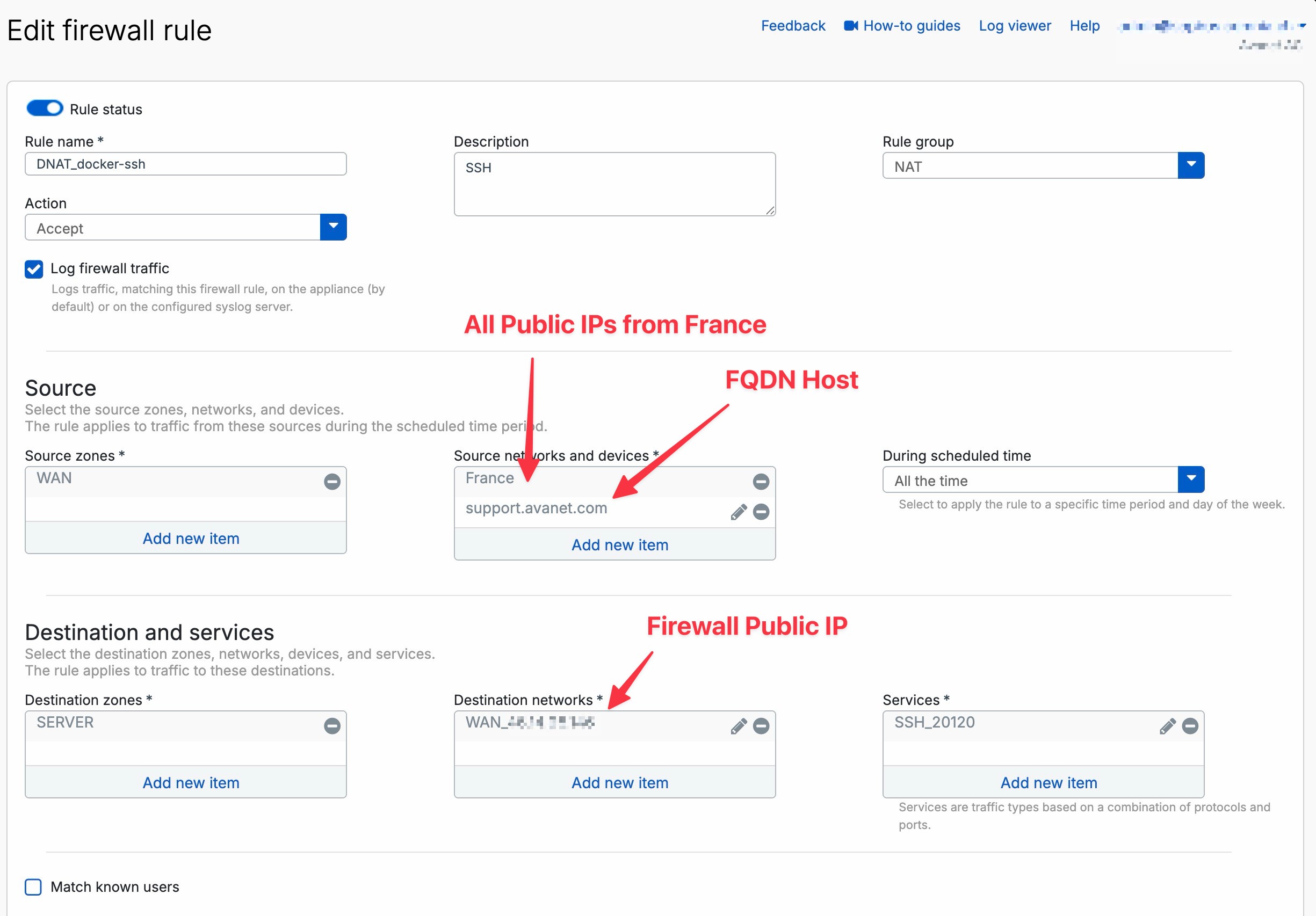
WANwhen access comes from the Internet. - Source networks and devices: As limited as possible, for example individual IPs, networks, countries or groups.
- Destination zones: Zone of the internal server by DNAT, for example
DMZorSERVER. - Destination networks: Public destination address or WAN host object from
Original destination. - Services: Without PAT, the service from
Original serviceis sufficient. For port translation, add both the external original service and the internal service fromTranslated serviceto the firewall rule. TheTCP 20120toTCP 22example therefore requires both service objects. - Security Profile: Depending on the service, IPS, malware scanning, web policy or another suitable check.
- Logging: Enable it for published services.
Without a suitable firewall rule, traffic is rejected despite DNAT.
This point is a common source of error: If you enter the internal server as the destination network, even though the rule expects the public WAN object, the rule does not match. The exact logic is explained in more detail in the article Understanding NAT on Sophos Firewall: SNAT, DNAT, MASQ, PAT.
The order also applies to NAT rules. Sophos checks NAT rules from top to bottom and uses the first matching rule. A NAT rule above that is too general can therefore prevent the specific DNAT rule from taking effect.
Existing connections retain their NAT translation even if the NAT rule is subsequently changed. Tests after a change should therefore use new sessions or cleanly terminate old connections; otherwise, the result may still reflect the previous state.
Advanced NAT options
These options only become relevant when internal clients use public names, return paths need to be specifically translated, or multiple target servers are involved.
Loopback, Reflexive and Linked NAT Rules
Sophos Firewall offers several NAT options that are easily confused:
- Loopback rule: Helps when internal clients should reach an internal server via the public IP or public DNS name.
- Reflexive rule: Creates a mirrored SNAT rule for new connections initiated by the published server. It is not required for the stateful response packets of an inbound DNAT session.
- Linked NAT rule: Created from a firewall rule and is a linked SNAT rule. A linked NAT rule is not the same as an inbound DNAT rule for a published server.
These NAT rules do not grant permission either. For required loopback access, inspect an existing sufficiently scoped rule under Rules and policies > Firewall rules, or create a matching rule if needed:
- Source zones: Actual client zone, for example
LAN. - Source networks and devices: Only the required internal client subnet.
- Destination zones: Translated server’s zone, for example
DMZ. - Destination networks: Original public destination from
Original destination, not the internal server IP. - Services: With PAT, both service objects from
Original serviceandTranslated service (PAT); in the existing example,TCP 20120andTCP 22.
For connections independently initiated by the server, the firewall rule must allow the actual server zone under Source zones and the internal server IP or server IP list under Source networks and devices. Restrict Destination zones, Destination networks and Services to the required destinations and services rather than copying Any indiscriminately. An existing sufficiently scoped rule may suffice; a new rule is not always necessary. Stateful replies to incoming DNAT sessions require neither a reflexive NAT rule nor new outbound permission. Check NAT order and return routing separately, enable logging and test the required internal and server-initiated paths separately with new sessions.
For classic server publications, an independent DNAT rule plus a suitable firewall rule is usually the clearest. Linked NAT rules can be useful if a firewall rule directly requires a special SNAT translation. However, in general environments, stand-alone, clearly named NAT rules tend to remain easier to understand and maintain.
Important: Loopback and reflexive rules are derived from the original DNAT rule. If the original DNAT rule is later changed, one should check the derived rules separately. Otherwise it can happen that external access has been adjusted correctly, but internal loopback access or outgoing server traffic continues to run according to the old logic.
This is not a cosmetic detail. Sophos creates loopback and reflexive rules with a reference to the name and ID of the original DNAT rule, but later changes to the original rule do not automatically update the derived rules. After changing the public IP address, destination server, service, or sources, these rules should therefore be opened and compared deliberately.
Load balancing and health check
When multiple internal servers are published behind a public IP, DNAT can also be used for load balancing or failover.
Possible methods are, for example:
- Round-robin
- First alive
- Random
- Sticky IP
- One-to-one
If you want the firewall to detect whether a target server is available, a Health check must be configured. Without a health check, the firewall can also forward traffic to a server that cannot be reached.
Security and go-live
A published service is immediately part of the public attack surface. That’s why close access, logging, security profiles and a clear rollback are part of the go-live.
Plan go-live and rollback
A DNAT publication should be treated as a small production change. As soon as the rule is active, the service may be reachable from the internet. Before go-live, document which rule will be enabled, how access will be tested, and how to roll back if problems occur.
Check before go-live:
- Back up the current firewall configuration or at least document the affected NAT and firewall rules.
- Record the IDs of all DNAT, loopback, reflexive NAT and firewall rules belonging to this change; for modified existing rules, record their previous enabled state and position.
- Check existing NAT rules for the same public IP, external port and WAN interface.
- Match the provider router, cloud security group or upstream firewall rules with the Sophos configuration.
- Consider DNS TTL when a hostname repoints to the published address.
- Prepare a test source outside of your own LAN, for example mobile phone, external location or controlled online port test.
- Set expected log locations: Log Viewer, NAT Rule ID, Firewall Rule ID, Packet Capture and Server Log.
- Define rollback criteria, for example wrong service accessible, server not responding, certificate error, security profile blocks legitimate traffic or unexpected source IP on the server.
For rollback, first check whether each recorded rule is shared by other publications. Disable only newly created rules belonging to this change, including separately generated loopback and reflexive NAT rules. Restore modified existing rules to their documented state and previous position instead of indiscriminately disabling a shared firewall rule. Then check the required external, internal and server-initiated paths with new sessions; disabling rules does not guarantee that existing connections end immediately. If an old publication has been replaced, it should be clear whether the old rule can be reactivated or whether provider port forwarding, DNS or monitoring must be reset first.
For critical services, you shouldn’t change several things at the same time. If DNS, provider router, NAT rule, firewall rule and server configuration are adjusted at the same time, an error is difficult to attribute later. A short process with clear steps is better: prepare, activate, test externally, check logs, check servers, document results.
Restrict access as closely as possible
Not every published service has to be accessible from the entire Internet. If possible, access should be limited.
Useful restrictions:
- Only allow single source IP addresses.
- Only allow known FQDN hosts when the other side uses dynamic IPs.
- Only allow certain countries.
- Explicitly block certain countries.
- Allow access only via VPN.
- Use a ZTNA solution instead of direct publication.
DNAT is usually not the best solution for administrative services such as SSH, RDP or internal admin portals. If access doesn’t need to be public, VPN or ZTNA is almost always a better choice.
Improve security
For published services you should check:
- Is the server currently patched?
- Is there a WAF or reverse proxy option?
- Is IPS active on the firewall rule?
- Are only necessary ports open?
- Is the service logged?
- Are there geo-IP, threat feed or source IP restrictions?
- Is MFA possible if it is a portal?
For web applications, Web Server Protection / WAF can also be useful instead of pure DNAT.
Bots and Threat Feeds
Public ports such as HTTP, HTTPS, SSH or RDP are constantly in the focus of bots. As soon as a port is accessible on the Internet, you can often quickly see connection attempts, scans, login attempts or exploit traffic in the log viewer.
This does not automatically mean that the server is compromised. But it shows that the service is part of the public attack surface. We therefore recommend additionally securing published services with IPS, logging, narrow sources and third-party threat feeds.
Threat feeds continuously provide the firewall with current indicators of compromise, for example malicious IP addresses or domains. This allows the firewall to block known attackers, botnets, or scanners before they reach the published service.
More: Sophos Firewall Threat Feeds
Test
After saving the DNAT rule:
- Test from an external network, not from the same LAN
- Only check the expected public port, do not scan broadly against foreign addresses
- Check Log Viewer for Firewall Rule ID and NAT Rule ID
- Compare packet capture with external source, public destination and internal destination
- Check server logs
- Control visible source IP on the target system
If the test is to be carried out from the internal LAN to the public IP, hairpin NAT or an internal DNS solution may also be necessary.
Test matrix for DNAT publications
A single port test is rarely enough for a production DNAT publication. A small test matrix is better because it separates allowed and unwanted paths. This shows not only whether the service is reachable, but also whether restrictions, logging and the return path work correctly.
Useful test sources:
- External permitted source: Test the connection from mobile data, an external site or partner network to the public IP and external port. The expected firewall rule ID and NAT rule ID must appear in Log Viewer.
- External source that is not permitted: If the publication is limited to specific sources, a test from a non-permitted source should deliberately fail. Otherwise, the source restriction is too broad.
- Internal client using the internal DNS name: Check whether internal users resolve directly to the internal server IP. This is often cleaner than loopback NAT.
- Internal client using the public FQDN: Only test this if the access is really required. If it fails, check split DNS first and do not automatically add loopback NAT.
- Target server itself: Check server log, local firewall, bound service, certificate and visible source IP. This shows whether the server sees the real external IP or an SNAT address.
- Monitoring or external health check: Check whether the test uses the same URL, port and source logic as the real monitoring.
After each test, evaluate only one finding: Does the traffic arrive at Sophos Firewall, does the expected NAT rule match, does the expected firewall rule match, does the packet reach the server and does a reply return? If several things are changed at the same time, the next error becomes much harder to assign.
A clean DNAT test compares three points of view:
- External Client: Connection to public IP and external port works or is deliberately blocked.
- Sophos Firewall: Log Viewer shows the expected Firewall Rule ID and NAT Rule ID.
- Internal server: Service sees the expected source IP, responds via the correct gateway and logs the access.
If only one of these perspectives is examined, typical errors remain undetected. For example, a successful external port test does not yet say whether logging, IPS, source restrictions or server owners are properly documented.
Troubleshooting and operations
After go-live, do not check only whether the service is reachable. Log Viewer, NAT Rule ID, Firewall Rule ID, server logs, and regular reviews of older publications are also important.
Troubleshooting
Common mistakes:
- Firewall rule missing
- wrong WAN IP selected
- Port forwarding on the provider router is missing
- Azure Network Security Group blocks the port
- Service is not running internally
- Server gateway does not point to the Sophos Firewall
- NAT rule is under another one that takes effect beforehand
- Firewall rule uses the wrong destination network in DNAT
- Port is already in use by another service
- Loopback missing when internal clients use public FQDN
- Health check is missing or incorrect when using load balancing
- Testing takes place from the internal network and not externally
- The target server responds back via a different gateway
- A security profile blocks traffic, but is not searched for in the correct log
The Log Viewer is the most important starting point for DNAT problems. There you can see whether traffic is arriving, which firewall rule and which NAT rule apply and whether the traffic is allowed or rejected. If the hit does not match what was expected, Sophos Firewall rule does not apply: check causes will help.
For deeper troubleshooting, you shouldn’t just look at the Sophos Firewall. If the log viewer allows traffic and packet capture shows that packets continue to the server, the cause is often on the target system: local firewall, incorrect default gateway, service not bound, certificate problem, application listening on a different port or upstream reverse proxy not responding as expected.
A quick classification helps so that you do not look in the wrong place:
- No hit appears in Log Viewer: Traffic does not reach the firewall or the wrong WAN IP is being addressed. Check the provider router, Cloud Security Group, public IP and Packet Capture on WAN.
- Firewall Rule ID matches, NAT Rule ID is missing: The NAT rule does not match or is too low in the rule order. Check
Original destination,Original service, inbound interface and NAT order. - NAT Rule ID matches, service does not respond: The target server or return path is not correct. Check the server firewall, default gateway, routing and Packet Capture towards the server.
- It works externally, but not internally via FQDN: Split DNS or loopback is missing. Check internal DNS resolution and only add loopback deliberately.
- After changing the wizard, only part behaves incorrectly: A derived loopback or reflexive rule no longer fits. Check generated NAT and firewall rules individually.
SMTP via DNAT after an SFOS 22 upgrade
If incoming emails are sporadically delayed or not delivered at all after an upgrade to SFOS 22, NC-184583 may be the cause. Sophos explicitly lists SFOS 22.0 GA Respin Build 411 as affected, but describes the issue more generally for upgrades to v22.x. MR1 and MR2 are not listed separately as affected or fixed. The only fix listed is SFOS 23.0 EAP0 Build 275 – an EAP version that should not generally be deployed on a production system. There is no public workaround; Sophos refers customers to Support.
A port test on TCP 25 is not sufficient for this symptom. Send several controlled email messages and record the UTC time, sender, recipient and Message-ID. Then compare the sender’s queue or bounce message with the queue and transport log of the internal mail server. The evidence package for Support should include the firmware build, timestamps, Rule IDs, fwlog.log, firewall_rule.log, nat_rule.log and the mail server logs. Log paths and the Consolidated Troubleshooting Report are described under Check Sophos Firewall services and logs via CLI. Explicitly mention NC-184583 in the support case.
The Known Issue describes the direct DNAT path to the internal mail server. In Sophos Firewall MTA Mode, the firewall accepts the message itself and forwards it. However, Sophos confirms neither that MTA Mode is definitely unaffected nor that switching to it would be the official workaround.
If the same direct DNAT path must be scanned transparently, Configure Mail Protection in legacy mode shows how to validate DNAT, SNAT, SMTP rules, and proxy scanning together. This is a regular design, not a workaround for NC-184583.
When Black Hole DNAT also helps
If a service deliberately needs to remain publicly accessible, but certain sources need to be intercepted before the actual publication, a black hole DNAT rule above the productive DNAT rule can make sense. This works, for example, for known bad IP lists, permanently unwanted countries or recurring scanner sources.
This technique does not replace a properly secured publication. The production DNAT rule must still be tightly scoped, logging must remain active, and the published server must be kept up to date. Black Hole DNAT is an additional blocking layer ahead of the publication, not the security architecture itself.
Black Hole DNAT is particularly useful in these cases:
Recurring scanner sources hit the same published service: The sources can come to nothing before the productive DNAT rule.
Individual countries should not have access to port forwarding: The block rule can be placed above the actual DNAT rule.
A maintained bad IP group already exists: The group can be used as
Original sourceof the Black Hole Rule.A service must remain public, but should achieve less bot traffic: The productive rule is retained, unwanted sources are intercepted beforehand
Black Hole DNAT is not suitable for local firewall services such as WebAdmin, User Portal, VPN Portal or SSH to the firewall itself. Device Access and Local Service ACL exception rules are responsible for this. For web servers via WAF, you should first check the WAF rule, blocked countries, authentication and WAF logs.
The order matters: The Black Hole DNAT rule must be above the production DNAT rule. Then use Log Viewer to verify that blocked sources match the Black Hole rule while permitted sources still match the production NAT and firewall rules. The exact procedure is described in Sophos Firewall: Block countries and malicious IPs.
Operational check
DNAT rules should be reviewed regularly. Old publications are a common security risk because services often remain reachable even after the application has been moved, replaced, or is no longer needed.
For production DNAT rules, document at least the following:
- Purpose of publication: The documentation must show why the service is publicly accessible.
- Responsible person or team: Without an owner, old publications are rarely removed.
- Public IP and external port: Facilitates testing, monitoring and external scans
- Internal target server and target port: Important for server migrations, load balancing and certificate changes
- Expected Sources: Helps to determine whether
Anyis really necessary - Protective measures: IPS, WAF alternative, MFA, threat feeds, logging and patch status should be traceable
- Expiry date or review date: Temporary publications need a defined end.
A meaningful review does not just consist of looking at the rule. You should check externally whether only the expected ports are open, check in the log viewer which sources are actually accessing, and check on the target server whether the application is still being maintained. If the service is only needed internally or for a few partners, VPN, ZTNA, a source IP restriction or a WAF rule should be re-evaluated.
When removing old DNAT rules, you should not just delete the NAT rule. Firewall rules, host objects, service objects, loopback rules, reflexive rules, DNS entries, monitoring checks or provider port forwarding are often attached to it. A short decommission process is better:
- Check last accesses in the log viewer.
- Have the responsible person or department confirm that the service is no longer required.
- First deactivate the NAT rule and the appropriate firewall rule.
- Test externally whether the port is closed.
- Check monitoring and server logs for errors.
- Only then clean up objects, DNS entries and provider rules that are no longer needed.
If the publication is still required, the review should end with a concrete result: keep it unchanged, restrict it further, move it to WAF, place it behind VPN/ZTNA, or review it again by a defined expiry date.