
Set up Avanet support access on Sophos Firewall
For a support case, Avanet may temporarily need direct access to the web admin console of a Sophos Firewall. On SFOS 22, this is only defensible when the task, account, permissions, source address, and end time are defined. The global WAN permissions for HTTPS and SSH remain disabled; access is provided through a targeted Local service ACL exception rule.
For many cases, screen sharing or an existing controlled partner account is sufficient. New direct WAN access is only appropriate when Avanet must analyse the issue or make changes independently. SSH is added only when the Device Console, Advanced Shell or log files are required.
Device Access and Local Service ACL on Sophos Firewall explains the technical foundations. A current Sophos Firewall backup should also be available before changes are made.
Important: Support access is administrative access to the firewall. The user, ACL rule and SSH key must be disabled or removed after the case unless permanent access has been agreed.
Diagnostics > Support access is not a shortcut for this procedure. It creates a time-limited access ID exclusively for Sophos Support, giving Sophos web admin and shell access without administrator credentials. Do not share that ID with Avanet.
Define the access and time period
Record the following in the ticket before configuring access:
- which work Avanet is authorised to perform,
- whether WebAdmin is sufficient or SSH is also required,
- when access starts and ends,
- which Avanet support source will be used,
- who approves access and verifies its removal.
Avanet must state the exact public egress IP or an explicitly designated FQDN in the authenticated ticket. Do not derive or guess the source from a website. Before making changes, open and test an independent recovery path through the console, management LAN, admin VPN, or Sophos Fusion (formerly Sophos Central).
Do not supplement an existing Avanet or partner account with a second permanent account. Instead, verify the profile, MFA, source restriction and status of the existing account. For joint troubleshooting without a direct login, screen sharing is often the lowest-risk option.
Set up the WebAdmin user
Set up Sophos Firewall administrators and profiles securely covers the general process for personal accounts, profiles, MFA, and offboarding. This section adds the support-specific case with a time window, support source, and controlled removal.
A local case account such as avanet-<ticket> is intended exclusively for the web admin console. A dedicated account makes changes easier to attribute in the Audit Trail than sharing the default admin account. SFOS stores usernames in lowercase, and they cannot be changed later.
- Go to Authentication > Users.
- Select Add.
- Enter the username and display name.
- Set User type to Administrator.
- Select an appropriate Profile.
- Enter a strong password used only for this access and the contact address confirmed for the engagement.


For example, use avanet-<ticket> as the Username, replacing <ticket> with the internal case number. This guide deliberately publishes neither a password nor a support address. The Administrator profile grants full WebAdmin access, so use it only when the engagement genuinely requires it. For limited work, create a profile under Profiles > Device access and set each menu to None, Read-only, or Read-write. Start with Read-only and grant Read-write only for approved changes.
Two additional restrictions are available under Administrator advanced settings:
- Schedule for device access: permits sign-in to the web admin console only during the selected schedule.
- Login restriction for device access: permits sign-in only from selected IPv4 addresses or an IPv4 range.
Under Login restriction for device access > Selected nodes, add the fixed support IP confirmed in the ticket. The Local Service ACL restricts console reachability, while this second control restricts the account’s sign-in. If the ACL uses an FQDN, this field still requires the currently confirmed IPv4 address. Select Save. The schedule restricts only this account’s sign-in; it does not disable the ACL rule or SSH automatically.
Test the password and MFA in advance
Transfer the password over an agreed secure channel and do not place it in email or ticket text. Under Authentication > Multi-factor authentication, choose Specific users and groups for OTP, add the case account, and select Web admin console under Require MFA for. Agree token enrolment and reset ownership before the appointment; never put the seed, QR code, or one-time codes in the ticket. MFA for administrators covers the details.
Accompany the first sign-in over the independent management path. Verify MFA and the profile without changing a production setting. If MFA is technically unavailable, do not quietly replace it with direct WAN access; use screen sharing, a VPN, or another agreed controlled path.
Restrict the support source and Local Service ACL
Create the source object confirmed in the ticket
For a short maintenance window, an IP host containing exactly the confirmed public egress IP has the smallest trust scope. If Avanet explicitly names a support FQDN in the ticket, the Local Service ACL also supports an FQDN host. The firewall then trusts every resolved address until the DNS TTL expires. Wildcard FQDNs are not supported.
- For a fixed IP, go to Hosts and services > IP host, select Add, and save the confirmed address as a single IPv4 host object.
- Only for a confirmed FQDN, go to Hosts and services > FQDN host and select Add.
- Enter a case-specific Name and copy the exact ticket value into FQDN.
- Select Save, then reopen the created object to verify it.

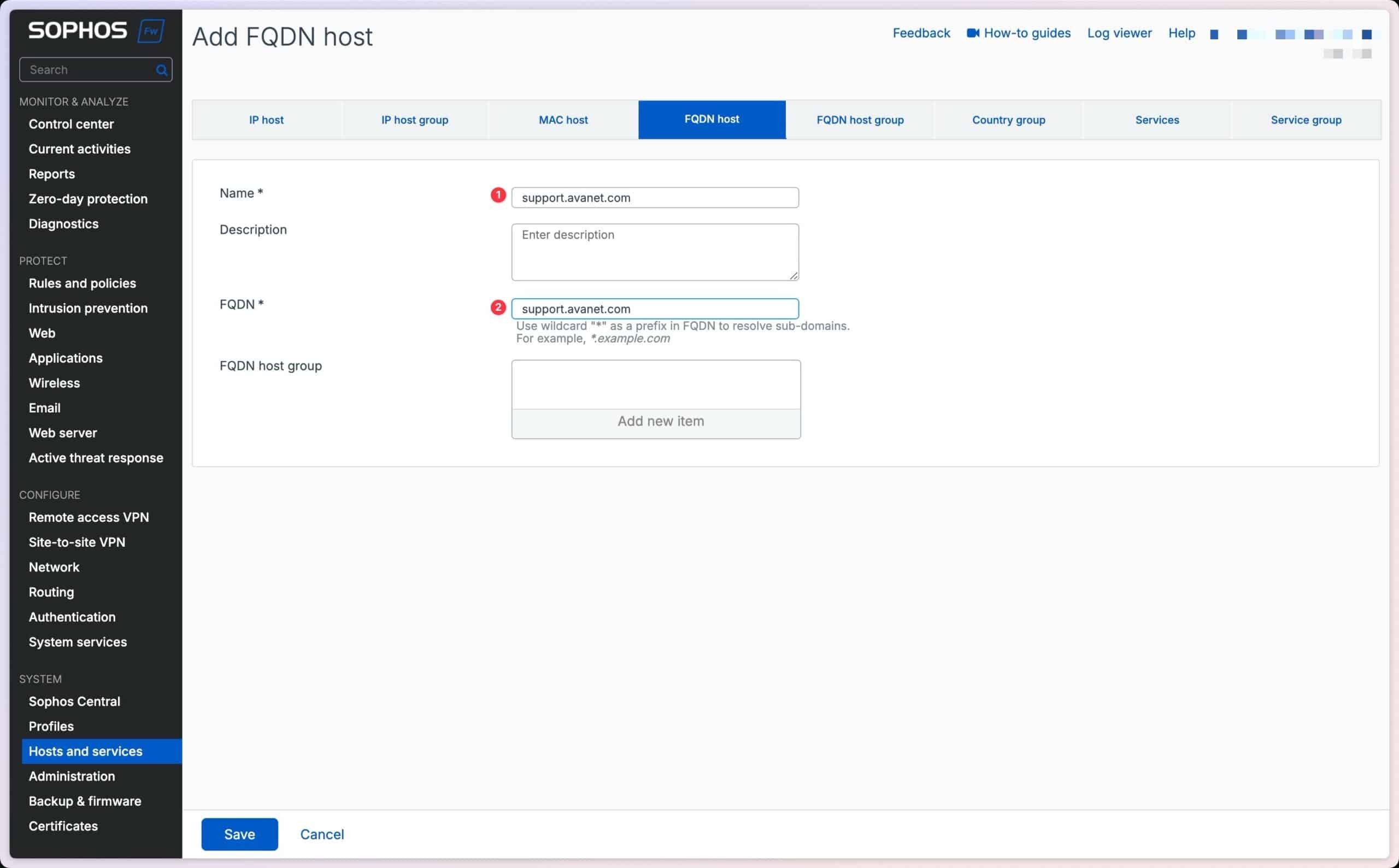
For an FQDN, compare every resolved address with the ticket. An unexpected or unconfirmed address is a stop condition: use the single confirmed IP instead or ask Avanet to clarify.
Create the Local Service ACL exception rule
HTTPS and SSH are local firewall services. Normal firewall rules do not control this traffic. Configure access under Administration > Device access instead.
- Go to Administration > Device access.
- Under Local service ACL, make sure HTTPS and SSH are not enabled globally for WAN.
- Scroll to Local service ACL exception rule and select Add.
- Create the rule with the following values.


- Rule name:
Avanet-Support - Rule position:
Top - Description: ticket number, purpose and planned end date
- IP version:
IPv4 - Source zone:
WAN - Source Network / Host: exactly the confirmed IP or FQDN object
- Destination host: the WAN address actually used; choose
Anyonly when several documented WAN addresses are required - Services:
HTTPS;SSHonly when confirmed as necessary;Ping/Ping6only for a specific diagnostic task - Action:
Accept
Select Save. Positioning the rule at Top ensures that the targeted permission is evaluated before an overlapping drop rule. Existing exception rules still need review: a broader accept rule above it or an incorrect source zone can change the intended security model.
Do not use:
Anyor0.0.0.0as the source. A global WAN permission exposes the web admin console far more broadly than necessary. Do not enable the WAN checkbox for HTTPS or SSH for this procedure either.
Add SSH only when required
SSH provides access to the Device Console and Advanced Shell and is therefore considerably more powerful than a restricted WebAdmin profile. For many support cases, Services should remain limited to HTTPS.

The case account cannot be used for SSH. Sophos Firewall uses the default admin user for this CLI access. The public key is therefore stored globally under Public key authentication for admin, not on the case account.
- Go to Administration.
- Select Device access.
- Scroll to Public key authentication for admin.
- Turn on Enable authentication.
- Paste the public key confirmed through the agreed secure channel under Authorized keys and add it with the plus button. First record the existing key set so that removal affects only the case key.
- Select Apply.
Only the default admin can add or remove SSH keys; Apply is not shown to custom administrators. Sophos supports RSA keys of at least 2048 bits and certain DSA and ECDSA keys, but not ED25519. Use a modern, sufficiently strong key that is supported by the SSH client in use.
A public key has the following structure, for example:
ssh-rsa <base64-public-key> avanet-support-<ticket>
This is a syntax pattern, not a usable key. The private key remains with the support engineer and is stored neither on the firewall nor in the ticket. After the case, remove the case-specific public key and SSH from the exception rule. Connect to Sophos Firewall via SSH explains the actual sign-in process.
Test access and troubleshoot failures
A successful sign-in from the permitted source alone is not sufficient acceptance testing. Also verify that access remains blocked from another internet source.
- Open WebAdmin from the agreed Avanet support source using the configured admin port. The default is TCP 4444, but it may have been changed under Administration > Admin and user settings.
- Sign in with the case account and verify that MFA works and the profile exposes only the required menus and actions.
- Test from a second internet source that is not permitted. The web admin console must not be reachable from it.
- If SSH was permitted, test sign-in as
adminusing the case-specific private key. Password-based SSH is not required for this test. - Check authentication events in Log viewer. Review configuration changes separately in the Audit Trail. For a read-write engagement, an innocuous approved test change can confirm attribution and must be reverted immediately.
- Record the result and access end time in the ticket.
If WebAdmin is not reachable
Start at the source and work towards the firewall:
- Does the actual egress IP match the source object and, for an FQDN, its current DNS results?
- Does the connection really enter through the zone selected under Source zone?
- Does the WAN address being contacted match Destination host?
- Is the exception rule at Top, and does it include HTTPS?
- Is the correct WebAdmin port being used?
- Is a provider router, upstream NAT device or upstream ACL blocking access?
- Does Login restriction for device access permit the TCP connection but reject sign-in for the user?
Do not enable the global WAN permissions for HTTPS or SSH while troubleshooting. A correctly configured exception rule does not require them for this targeted access.
If sign-in fails
If the console is reachable but sign-in fails, check the user status, password, MFA, profile, Schedule for device access, Login restriction for device access and the system-wide Block login settings under Administration > Admin and user settings. After repeated failed attempts, Sophos Firewall can temporarily block the source IP from all sign-in services.
Remove access in a controlled manner
After the support case, review the agreed configuration changes and the access itself separately:
- Use the Audit Trail to verify which configuration changes were made by the case account, and separately reverse operational changes that must not remain.
- For larger rule-set changes, Sophos Firewall Config Studio can support a before-and-after comparison.
- Disable or delete the Local Service ACL exception rule first, closing the external path.
- Verify from the former support source that WebAdmin and SSH are no longer reachable, while the independent management path still works.
- Remove only the case-specific SSH public key. Turn off Enable authentication only if no other keys depend on it.
- Disable or delete the case account and remove its MFA token unless permanent access was explicitly approved.
- Have a second person compare the ACL, account, key set, Audit Trail, and ticket with the starting state.
Any deliberately retained partner access still requires MFA, a tightly restricted source, a responsible owner and regular review. An inactive ticket is not a reason to leave management access permanently open.
Frequently asked questions
Must SSH be enabled for Avanet support access?
Can Avanet sign in through SSH with the case account?
admin user for this SSH access. The case account is for WebAdmin; its administrator profile does not create a separate SSH user.What happens if the address behind the confirmed FQDN changes?
Should the Local Service ACL source be set to Any?
Any and 0.0.0.0 are not permitted for WebAdmin access from WAN. Use a specific FQDN host, IP host or tightly scoped network object.Which services must be permitted for support access?
HTTPS is sufficient. Add SSH only for CLI work. Ping/Ping6 is optional for a specific diagnostic task and should not automatically be part of permanent access.