
Activate Sophos Firewall Licence Key
If the Sophos License Schedule contains a Subscription Key, activate it in SFOS 22 under Administration > Licensing > Activate subscription. Then check the key with Verify key, review the displayed subscription, and activate it with Confirm.
Renewals are often assigned automatically to the serial number in the order and do not include a new key. In this case, do not reuse an old key. Click Synchronize under Administration > Licensing instead.
⚠️ Important: A licence key can be used only once and is tied to a specific firewall model. Activating it does not change firewall rules, VPN configurations, or the Central Management registration.
Check before activation
- The firewall is claimed in the correct Sophos Fusion (formerly Sophos Central) account.
- Under Administration > Licensing, the Base License has the status
Subscribed, notEvaluating. - The model and Sophos Firewall serial number match the License Schedule.
- The Subscription Key has not already been used on another firewall. A License ID in Sophos Fusion is not the licence key.
- The firewall has internet access for online activation and synchronization.
- On a Hardware as a Service (HWaaS) device, the bundle is assigned automatically; you cannot apply your own subscriptions.
For an isolated hardware appliance, use the separate procedure for Air gap licensing and pattern updates. If the License Schedule does not contain a key, the subscription may already have been activated automatically.
Defer registration during initial setup
During initial setup, firewall registration can be deferred. The appliance can then be used for 30 days. License registration appears at every sign-in but can be skipped during this period.
After 30 days, registration is mandatory before an administrator can sign in to WebAdmin again. At the same time, every license except Base Firewall expires. This grace period is therefore not an operating model for production systems. Complete and document registration, claiming in the correct Sophos Fusion account, and license status during commissioning.
Activate the licence key on the firewall
- Sign in to the Sophos Firewall WebAdmin Console.
- Open Administration > Licensing. The current SFOS 22 Licensing info page gives this full path, while the setup guide abbreviates it to Administration. Activation, status, and synchronization are in the licensing section. In older UI versions, the same product section is available from the user menu under About product.

- Click Activate subscription.
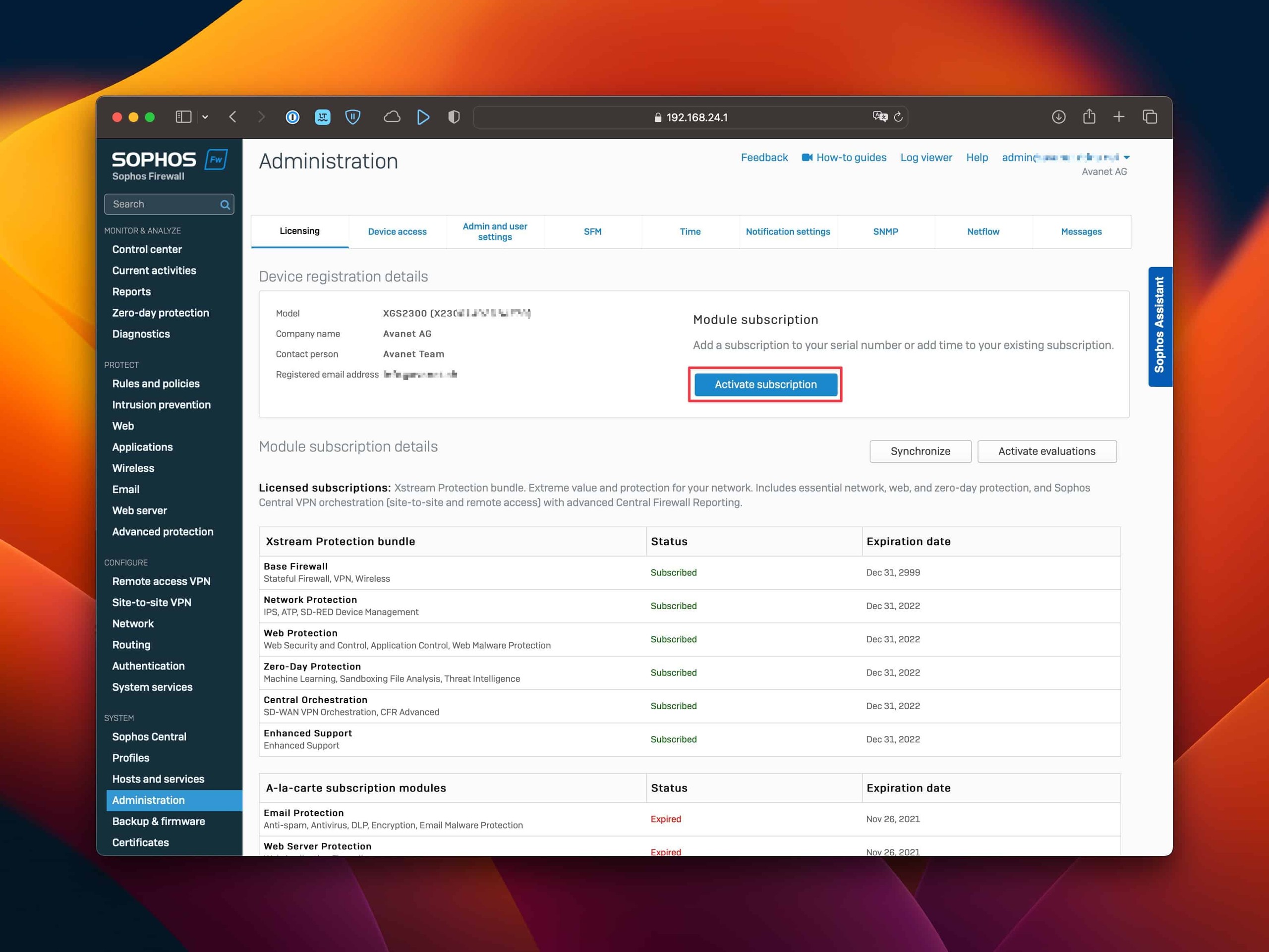
- Paste the Subscription Key from the License Schedule. Do not enter a License ID, serial number, or a key that has already been used.
- Click Verify key, then check the model, subscription, and term.

- Activate it with Confirm. The new subscription must then appear as
Subscribedunder Module subscription details.
New subscriptions start when the order is fulfilled; entering the key later does not shift the start or expiration date.
Alternatively, activate it in Sophos Fusion
- Sign in to Sophos Fusion at fusion.sophos.com and open the profile icon.
- Select Licensing, then the Firewall licenses tab.
- Find the firewall by its serial number and expand its details.
- Click Apply subscriptions.
- Enter the Subscription Key and select Preview subscription.
- Check the assignment and term, then confirm with Apply subscription.
- On the firewall, click Synchronize under Administration > Licensing.
Current Sophos pages give two routes to the same Sophos Fusion inventory: the Sophos Fusion Licensing Guide uses profile icon > Licensing > Firewall licenses, while the SFOS 22 setup guide uses My Products > Firewall Management > Firewall licenses. Either route may be visible, depending on the Sophos Fusion navigation shown. The target view includes search by firewall name, serial number, and model, as well as Apply subscriptions.
Claiming, licence assignment, and Central Management are separate operations. If the firewall is in the wrong Sophos Fusion account, see Transfer Sophos Firewall to another Sophos Fusion account; the Central Management registration must be changed separately if required.
Manage firewall licenses in Sophos Fusion
The central inventory is under profile icon > Licensing > Firewall licenses. Search firewalls by name, serial number, and model, or filter by claim period, expiration period, and subscription status. Hidden devices appear only after turning on Show hidden. The display name can be changed directly through the existing name, but the serial number remains authoritative for licensing and transfer decisions.
The same view claims firewalls, applies or transfers subscriptions between devices, moves firewalls to another Sophos Fusion account, starts evaluations, generates Air Gap licenses, and downloads firmware files through Other Downloads. These actions are not equivalent: a claim assigns a serial number to the account, Apply subscriptions redeems a license key, and Transfer subscriptions moves an existing entitlement to another firewall.
Fixed restrictions apply to Hardware as a Service (HWaaS). In this view, administrators cannot apply their own subscriptions to such devices, transfer subscriptions between firewalls, activate evaluations, or move firewalls between Sophos Fusion accounts.
Evaluate a subscription bundle
For an already claimed firewall, Activate evaluations can enable selected functions for 30 days. After selection with Evaluate selected, trial licenses appear in the firewall details. An expired evaluation can be started again in Sophos Fusion when its expiration was at least 90 days ago. Before then, Sophos Fusion does not show Activate evaluations for the renewed trial. By contrast, the SFOS 22 Licensing info page says that an evaluation activated again on the firewall becomes available in the next major version. Sophos therefore documents different criteria for the two routes; this article does not apply Sophos Fusion’s 90-day rule to activation directly in SFOS.
Document an evaluation like a production subscription and test technically before it expires. It replaces neither renewal nor a support contract and must not become an unnoticed requirement for a production data path.
Why a new term can be shorter
When Enhanced Support or a bundle containing it is activated on a firewall whose warranty or previous support entitlement has expired, Sophos can shorten the new term. A fair-value calculation retrospectively covers the support gap, limited to at most six months.
For a standalone Enhanced Support subscription, the reduction generally equals the support gap. If the previous entitlement expired two months ago, for example, two months are deducted from the new term. For a bundle, Sophos converts the value share of Enhanced Support based on USD list price into a corresponding number of days.
Entering the same key again does not correct an unexpectedly short term. Review the old expiration date, activation date, ordered term, and License Schedule together, and escalate discrepancies to the partner or Sophos.
Renewal, mid-term upgrade, and license model changes
Always order a renewal against the serial number of the firewall actually being licensed. Two current Sophos pages conflict about the key: the key activation FAQ says all firewall renewals are activated automatically after order processing without a key, while the renewal FAQ says the License Schedule either contains a key or confirms automatic activation, depending on the country. Follow the License Schedule actually delivered: activate a new key shown there; if there is no key, synchronize and verify the status. Older XG license packages can now consist of several products. A former TotalProtect Plus, for example, is not replaced by Xstream Protection alone if Email Protection and Web Server Protection are still required.
The new term normally begins the day after the existing subscription ends. If the old subscription had already expired when activated, the renewal generally starts on the activation date and can sometimes be backdated. Review the old expiration date, new start date, and actual protection state together after every renewal.
Expand a license during its term
A mid-term upgrade is processed through a partner quote. The residual value of active subscriptions is credited to the new order. As soon as the change is activated, however, the new subscription starts immediately and the remainder of the previous one ends unless a future start date was expressly agreed.
A downgrade is not possible during the active contract period. Before activation, document the new feature set, credit, start date, and residual term in writing. An apparently cheaper upgrade is no advantage if it starts unintentionally and replaces a still-needed term.
Review overlapping subscriptions
Sophos Fusion can apply a new subscription even when it is identical to an existing subscription or shares functions with it. For paid overlap, Apply subscription warns before applying the new entitlement. Sophos Fusion then shows the merged subscription and its new expiration date.
Do not confirm this warning blindly. First document affected modules, old and new terms, and the expected final configuration. The same applies when transferring a subscription to a firewall that already has an overlapping license.
Convert a term license to MSP Monthly
An active or expired term license can be converted to monthly MSP licensing through Sophos Fusion Partner. For an expired license, select the new subscription in the firewall details and then verify the new expiration date.
With an active term license, conversion can destroy paid residual value. If a monthly Xstream Protection Bundle replaces an active Central Orchestration term license, for example, Sophos Fusion explicitly warns about the lost term-license value. Proceed only after commercial approval and documented confirmation of which functions and residual values are being replaced.
For virtual firewalls, also consider licensed size. A normal term license binds the virtual firewall size to the Base License and it cannot be changed during the term. Sophos names an MSP termed license as the exception. Review CPU size, license model, and intended change together before scaling.
Check the licence status
After activation, check the following under Administration > Licensing:
- correct serial number and appliance model
- status
Subscribed - expected subscription and included modules
- expiration date and support status
- same assignment in Sophos Fusion
A new licence enables the entitlement but does not configure any policies. Newly licensed features must therefore be configured, tested, and monitored separately. Understand the Sophos Firewall Base License explains the differences between the Base License, support, and security subscriptions.
In active-passive HA, the Initial Primary holds the licences and the auxiliary receives a copy. In active-active HA, both devices require their own licences of the same types, although their expiration dates may differ. The roles and licence requirements are described in Sophos Firewall HA cluster variants.
After activation, check both serial numbers, HA roles, and the visible licence status. In active-active mode, the licence must match on both devices.
Online firewalls normally synchronize their licences every 24 hours and issue a warning after 70 days without a successful synchronization. After 90 days, security subscriptions are deactivated. Users can still sign in and traffic can continue to flow, but without the deactivated protection functions. A successful license synchronization resets this incommunicado period. Without an immediate manual synchronization, a subscription just applied in Sophos Fusion can take up to 24 hours to appear through the automatic synchronization.
On hardware appliances, the Base Firewall and Enhanced Support remain active; on virtual or software appliances in active-passive HA, the Base License may also be deactivated and HA disabled. Air gap licensing has a separate 180-day period.
If activation or synchronization fails
- No key in the License Schedule: Check whether Sophos or the partner has already activated the renewal automatically. Then run Synchronize on the firewall.
- The key is rejected: First check for spaces or transmission errors. The key may already have been used, belong to the wrong model, or have been replaced by a corrected order. The firewall must also be claimed and the Base License must have the status
Subscribed. Paid keys cannot be used with Home or free 30-day licences. - The subscription is in Sophos Fusion but not on the firewall: Click Synchronize under Administration > Licensing. If it fails, check the internet connection and investigate DNS, routing, and system time as possible causes.
- Wrong firewall or wrong account: Do not test the key on additional devices. Record the serial numbers and License Schedule, then clarify the appropriate subscription or account transfer. For a replacement device, use the separate Sophos Firewall license transfer workflow.
For the message Synchronization with server failed, you can monitor the licence log live in the Advanced Shell:
tail -f /log/licensing.log
Then trigger Synchronize in WebAdmin and check the new log lines for connection, certificate, or assignment errors. Stop the output with Ctrl+C. The command only reads the log; Connect to Sophos Firewall using SSH explains how to open the Advanced Shell safely.