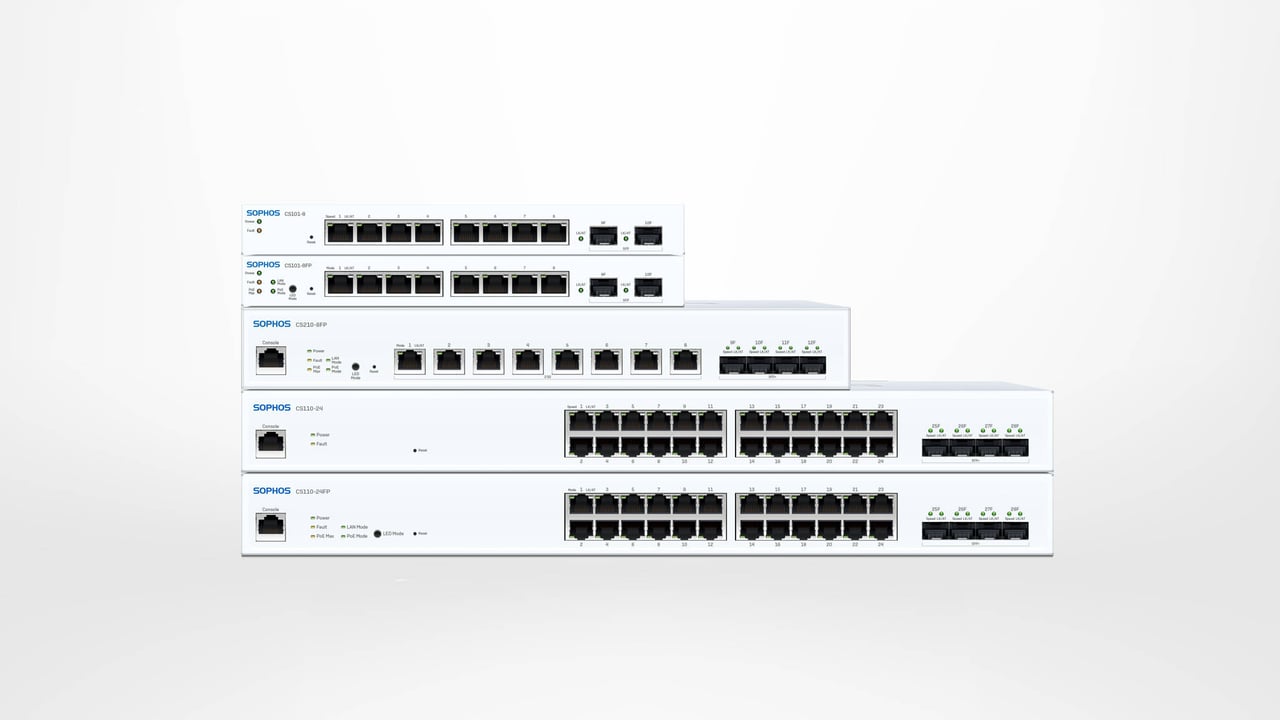
Sophos Switch – What you need to know about the new product
Sophos launched its Switch series in late 2021 as a new access-layer platform. This article dates from that launch period. We have retained the original observations and photos, while clearly marking time-sensitive forecasts as historical and updating the product overview to reflect the current feature set.
Hardware: from 10 announced models to 11 documented models
At launch, the announced range consisted of ten models. Their names still reveal key characteristics: CS identifies the product family, the following digits indicate the series and port count, and P and FP identify PoE variants with different power budgets. The original CS110-48FP example illustrates this scheme:

Model range at launch in 2021
- 100 Series with 1 Gbit/s copper ports:
CS101-8,CS101-8FP,CS110-24,CS110-24FP,CS110-48,CS110-48PandCS110-48FP - 200 Series with multi-gigabit ports:
CS210-8FP,CS210-24FPandCS210-48FP
The original article announced the CS210-24FP and CS210-48FP for “mid-2022”; both were subsequently enabled for central management. The technical documentation now also lists the CS1010-8FP, with eight copper ports supporting up to 10 Gbit/s. The documented hardware range therefore comprises eleven models. This list does not, however, confirm current availability.
When selecting a model, consider not only port count and link speed, but also uplinks, the PoE standard and total PoE budget, cabling, cooling and noise. For the complete current matrix and a practical selection process, see Choose a Sophos Switch model and management method.
Test device from the launch period
Sophos provided us with a Sophos Switch CS110-48P for testing in October 2021. The following photos document that device; they do not represent the entire current portfolio.


Local or central management
Sophos Switches can be managed locally through the web interface and CLI. Depending on the task, the device-level REST API and SNMP are also available. Central management, which offered only limited functionality at launch, is now much broader: Sophos has added VLAN and port controls, Layer 3 features, DHCP relay and snooping, backups, STP management and virtual stacks.
The console formerly called Sophos Central is now named Sophos Fusion. This article uses the new name when describing the current product; the 2021 screenshots still show the Central interface used at the time.
Choose one management method as the authoritative path for day-to-day operation:
- Local: suitable for a single switch that is deliberately managed locally or for an isolated deployment. The web GUI, CLI and REST API change the individual switch directly; SNMP provides monitoring.
- Sophos Fusion: suitable for central visibility, multiple switches or locations, sites and virtual stacks, and cross-product features. Managing and changing a switch through Sophos Fusion requires an appropriate Switch Support and Services subscription for each switch.
Local changes do not automatically become the configuration held in Sophos Fusion. Avoid switching between the two methods without a documented reason. How is Sophos Central licensed? explains license scope and behavior without a valid subscription; Sophos Hardware Warranty covers warranty and RMA.
Local web interface: historical screenshots
On the test device, the local GUI already offered a responsive interface, dark mode and several languages. The following images show firmware from the launch period and should not be treated as a current menu reference:


CLI and REST API access require separate security decisions. Manage a Sophos Switch through the CLI and REST API explains authentication, safe use and the limits of both methods. For external monitoring, Configure SNMP monitoring for Sophos Switch covers users, notifications and tests.
Central management: from the early Central release to Sophos Fusion
In December 2021, Sophos Central already showed device overview, VLANs, port settings, tasks and diagnostic views. The following screenshots capture this early stage:


For commissioning today, a serial number alone is not enough. Prepare and verify the IP configuration, DNS, outbound destinations, tenant, site or stack, and subsequent synchronisation status. The runbook Register a Sophos Switch in Sophos Fusion covers bootstrap, registration and acceptance.
What happened to the original feature announcements
At launch, it was clear that the software would be expanded gradually. Dated release notes now document that development. Additions included central CLI commands, further VLAN and Layer 3 features, backup management, more STP controls and switch stacking. The broad 2021 statement that the software was “not yet finished” is therefore no longer a useful product assessment. What matters is whether the current feature set meets the requirements of the specific network design.
In particular, consider:
- Segmentation: VLANs reduce broadcast domains and can separate security zones at the access layer. See Configure VLANs on Sophos Switch.
- Firmware maintenance: A historical release note is not a recommendation for today’s target version. Updates, rollback and recovery belong in a maintenance window; see Update, roll back and restore Sophos Switch firmware.
- Central fleet: Sites, virtual stacks, synchronisation status and the configuration source must remain unambiguous in day-to-day operation; see Operate a Sophos Switch fleet: synchronisation, sites and stacks.
Availability: the original forecast and what to check today
The original article expected the first deliveries in mid-December 2021 and supply constraints to ease in February or March 2022. This was a time-specific forecast made during the chip shortage and is no longer relevant to current decisions.
For current projects, remember that technical model documentation confirms specifications, not stock or commercial availability. Before ordering, verify the exact model and product code, current delivery status and product lifecycle.
Conclusion
The original concept remains: Sophos Switch complements firewalls and access points with wired access-layer switches that can be managed locally or centrally. Since 2021, the central platform has gained important operational features. That does not automatically make the range the best choice for every network.
For a sound decision, compare port and uplink requirements, PoE budget, Layer 2 and Layer 3 features, redundancy, management, licence costs and lifecycle with the project requirements. Integration with Sophos Fusion does not replace a technical requirements list. If the project needs a core switch or capabilities outside the documented access-layer scope, alternatives must still be evaluated.